CEH v13 | M03-08: IDS/firewall effects and protection against scanning
A plain-language lesson: how can you tell whether traffic was actually blocked?
The central distinction is between an unresolved scan result, detection of suspicious activity, and successful prevention.
Imagine you are a hospital security engineer. Your manager asks:
Yesterday's penetration test returned filtered in Nmap, and our IDS raised an alert. Does that mean our firewall blocked the attack?
You need more evidence before answering yes:
1. Did the firewall block the probe, or did a network problem prevent a reply?
2. Can the IDS actually block packets in its deployed mode?
3. Did the firewall execute a blocking action?
4. Did the traffic reach the server?
5. Does this test say anything about other sources or services?
This lesson develops a defensible judgment from packets, scan results, and security-device records.
1. Today's conclusion
1.1 Separate three kinds of evidence
Suppose you are examining a hospital test server at `192.0.2.10`, a documentation address. Its HTTPS test service uses TCP port 8443. Nmap returns:
PORT      STATE       SERVICE
8443/tcp  filtered    https-alt
The IDS also reports:
Alert: Possible Port ScanWhat do these observations establish?
First: the scan result
The scanner is effectively saying:
I tried to determine the port's state, but the available replies did not let me determine whether it was open.
That is the meaning of `filtered`. It describes the scanner's observation; it does not identify an action inside the firewall.
Second: the detection result
The IDS is saying:
I observed activity that matched a suspicious-scanning condition and generated an alert.
This does not establish that traffic was blocked. Like a camera, an IDS may record an event without intervening in the connection.
Third: the prevention result
You then find:
Firewall Log:
Source: 198.51.100.25
Destination: 192.0.2.10
Port: 8443
Action: DROP
Rule: FW-17
This is a direct device record of a drop action. You must still match it to this test and compare the actual packet path and server records.
What each source can establish
| Evidence | What it tells you | What it cannot establish by itself |
|---|---|---|
| Nmap: filtered | The scanner could not determine the port state | The firewall definitely blocked it |
| IDS: alert | A detection condition generated a notification | The attack was blocked |
| Firewall: DROP | The firewall recorded a packet-drop action | The whole system is secure |
| Server log | Activity recorded at the server | An absent record means no packet arrived |
Record what you observed before treating an explanation as established fact.
2. Think of access control, cameras, and security staff
The three technologies are Firewall, IDS (Intrusion Detection System), and IPS (Intrusion Prevention System).
2.1 Firewall: a building's access-control system
Imagine a research building with three areas:
- The public can enter the first floor.
- Only researchers can enter the second floor.
- Only system administrators can enter the third floor.
Access controls at the entrances enforce those permissions. A network firewall similarly decides which traffic may pass according to configured conditions.
| Source | Destination | Port | Firewall policy |
|---|---|---|---|
| Internet users | Public website | 443 | Allow |
| Internet users | Database | 5432 | Deny |
| Management subnet | Management interface | 8443 | Allow |
| Unauthorized external source | Management interface | 8443 | Drop |
This table describes network access policy. The firewall evaluates arriving packets against its rules.
What can a firewall inspect?
Common conditions include:
① Source IP: who sent the packet?
② Destination IP: where is it going?
③ Protocol: is it using TCP, UDP, or another protocol?
④ Port: which service on the server is being addressed?
⑤ Connection state: does the packet belong to an established or otherwise permitted connection?
Some next-generation firewalls (NGFWs) also inspect application, user identity, and other attributes. Actual capability depends on the product, deployment, and visibility into encrypted traffic. A firewall is a control point that enforces network access policy.
2.2 IDS: a surveillance camera
Suppose someone repeatedly tries entrances to different floors. A monitoring system may notice that the person:
- Tried many doors within a minute.
- Repeatedly changed the area they attempted to enter.
- Appeared at an unusual time.
- Matched a configured suspicious-behavior condition.
The system raises an alert. A network IDS similarly analyzes the traffic available to it. For example:
10:00:01  TCP connection attempt → Port 21
10:00:02  TCP connection attempt → Port 22
10:00:03  TCP connection attempt → Port 80
10:00:04  TCP connection attempt → Port 443
10:00:05  TCP connection attempt → Port 3389
An enabled rule might recognize multiple destination ports in a short interval and generate:
[ALERT]
Category: Potential Network Scan
Source: 198.51.100.25
Destination: 192.0.2.10
An IDS primarily detects and reports activity; it may have no direct ability to stop these packets. If it receives copies through switch port mirroring or SPAN, it can observe traffic while sitting outside the forwarding path.
A camera recording an intrusion does not mean the camera stopped the intruder.
Some IDS deployments trigger another device through an automated response integration. That is an additional mechanism whose execution must be verified separately from the alert.
2.3 IPS: security staff who can intervene
Now add security staff who can refuse entry when someone violates policy. An IPS similarly can take prevention actions according to detection results and rules:
Source: 198.51.100.25
Destination: 192.0.2.10
Detected: Policy violation
Action: DROP
It may discard traffic before it reaches the destination.
Why does an IPS usually need to be in the traffic path?
Compare two arrangements.
Architecture A: passive IDS
External computer
    │
    ▼
 Firewall
    │
    ▼
  Switch ─────► IDS
    │          (receives a copy)
    ▼
  Server
The IDS can analyze the mirrored data, but packets do not need to pass through it to reach the server.
Architecture B: inline IPS
External computer
    │
    ▼
 Firewall
    │
    ▼
   IPS
    │
    ├── Allowed condition → forward
    │
    └── Blocking condition → discard
    │
    ▼
  Server
Inline means the device sits on the forwarding path and can enforce a decision as traffic passes. A modern firewall may integrate IPS functionality, so the diagram need not correspond to two separate appliances.
Comparing the roles
| Technology | Main purpose | Everyday analogy | Can it block? |
|---|---|---|---|
| Firewall | Traffic control | Decide who may pass | Yes |
| IDS | Detection | Identify and report suspicious activity | A passive IDS usually cannot block directly |
| IPS | Prevention | Detect and enforce protection | Yes, depending on mode and rules |
Judge prevention using position, operating mode, and recorded action, as well as the device's name. See the NIST firewall guide and NIST IDPS guide.
3. How a firewall changes the port state you observe
Connect this section with M03-03 on TCP Connect/SYN scanning and M03-07 on Nmap.
3.1 Recall the TCP three-way handshake
A normal TCP connection begins with:
Your computer                  Web server
    │                              │
    │ ─────── SYN ────────────────► │
    │ ◄───── SYN-ACK ────────────── │
    │ ─────── ACK ────────────────► │
    │       Connection established │
1. SYN: I want to establish a connection.
2. SYN-ACK: I received your request and agree to begin.
3. ACK: I acknowledge your response.
A firewall in the path can change what the scanner receives.
3.2 Allow: forward the traffic
Suppose policy permits TCP port 443:
Your computer
   │ SYN
   ▼
[Firewall]
   │ Allow
   ▼
[Web server]
   │ SYN-ACK
   ▼
Your computer
In a SYN scan, a valid SYN-ACK normally supports:
443/tcp openThis does not mean you logged in or found a known vulnerability. It means this probe received a response supporting an open port state.
3.3 Drop: silently discard the packet
Change the policy to:
Source: External Network
Destination Port: 443
Action: DROP
A possible path is:
Your computer
   │ SYN
   ▼
[Firewall]
   ✕ Discard

[Web server]
 No SYN received
The scanner sends SYN but receives no expected reply. After waiting and possibly retrying, it may report:
443/tcp filteredSilence does not identify the firewall as the cause. Other possibilities include:
- Packet loss.
- Routing problems.
- A reply blocked elsewhere on the return path.
- A target or intermediate device that failed to respond normally.
Treat `filtered` as an observation requiring further investigation.
3.4 Reject: actively refuse and reply
Drop is like ignoring a knock. Reject is like explicitly answering that entry is refused. A network device may send TCP RST or an ICMP error:
Your computer
   │ SYN
   ▼
[Firewall]
   │ REJECT
   └────────► TCP RST
In a typical SYN scan, TCP RST may support:
443/tcp closedAn ICMP response indicating administrative prohibition may instead support:
443/tcp filteredThe interpretation depends on the method and actual response. The shortcut “Drop means filtered; Reject means closed” is therefore incomplete.
The six Nmap states
| State | Plain-language meaning | Interpretation |
|---|---|---|
| `open` | A response supports an open state | The port accepts the corresponding communication |
| `closed` | A response supports a closed state | This probe did not find a listening service accepting the connection |
| `filtered` | Filtering or network conditions prevent a decision | Whether the port is open remains unresolved |
| `open|filtered` | Open and filtered cannot be distinguished | Both possibilities remain |
| `unfiltered` | The port is reachable, but open/closed is unresolved | Common in ACK scanning |
| `closed|filtered` | Closed and filtered cannot be distinguished | Used by particular scan methods |
These are the six official Nmap states. They describe a view from a particular observation point rather than a permanent intrinsic property of the service.
Why can an internal scan say open while an external scan says filtered?
Consider a laboratory NAS at `192.168.1.100`, port 443.
Lab computer → Internal switch → NAS:443
                                  │
                           SYN-ACK returned
Result: open
From outside:
External computer → Boundary firewall
                           │ DROP
                           ✕
                          NAS
Result: filtered
Both can be correct because the paths and applicable policies differ. A test report therefore records source position, time, and method along with port state. Every result has observation-point and test-condition limits.
4. Detection, notification, and successful blocking need different checks
Having separated the roles, we now ask how IDS/IPS identifies suspicious traffic and decides which action to take.
4.1 Signature-based detection
A signature is a recognition rule. Like an investigator comparing conduct with a known pattern, an IDS checks whether observed activity matches specified conditions:
Hypothetical detection condition:
Same source IP
Same destination server
Short observation window
Attempts against multiple ports

If matched:
Generate a Possible Port Scan alert
The system need not identify the person behind the traffic. It evaluates the pattern. A new technique outside existing rules may be missed, while legitimate administration may also match. An authorized Nmap scan may trigger a scanning rule. A rule match alone does not establish a malicious actor.
4.2 Anomaly-based detection
Anomaly detection compares activity with a normal baseline. A hospital device may usually behave like this:
08:00 → Connect to internal API
08:05 → Upload a record
08:10 → Upload a record
08:15 → Upload a record
Then one night:
03:00 → Connect to unfamiliar external IP
03:01 → Attempt 100 different ports
03:02 → Transfer a large amount of data
A detector may flag the departure from normal behavior without knowing a named attack technique. Unusual activity still needs investigation: upgrades, maintenance, and migration can also change traffic patterns.
Signature versus anomaly
| Comparison | Signature | Anomaly |
|---|---|---|
| Principle | Match an existing rule | Detect departure from normal behavior |
| Analogy | Compare a known pattern | Notice unusual activity |
| Strength | Matching behavior is often easier to explain | May reveal previously unknown anomalies |
| Limit | Rules may not cover a new attack | Normal changes may look threatening |
| Typical need | Maintain detection rules | Establish a trustworthy baseline |
Products may combine both methods.
4.3 False positives and false negatives
False positive
Normal activity is classified as suspicious:
Ground truth:
An authorized security scan

IDS classification:
Suspected malicious port scan

Result:
False Positive
This classification assumes the activity has been confirmed as legitimate, expected, and outside what the rule should require action on. Authorization alone does not automatically make every scan alert a false positive.
False negative
An event within the detection objective occurs but is not reported:
Ground truth:
Malicious activity that should be detected

IDS classification:
No anomaly found

Result:
False Negative
Both labels require trustworthy ground truth. No alert alone cannot establish a false negative; first establish that an event within the detection objective actually occurred. As in AI classification:
- False positives increase investigation effort and may disrupt normal work.
- False negatives may leave genuine threats unnoticed.
4.4 Suricata: deciding whether to alert or block
Suricata is an open-source network threat detection and prevention engine. A rule has three principal parts:
Action + Header + Rule OptionsIn everyday terms:
What to do?
    +
Which traffic to inspect?
    +
Which conditions make it a match?| Action | Meaning | Practical reading |
|---|---|---|
| `alert` | Generate an alert | Notify an operator of a match |
| `drop` | Discard matching traffic | Prevent the packet from passing |
| `reject` | Actively refuse | Send RST/ICMP refusal; IPS mode also enables drop |
| `pass` | Stop further packet inspection | Skip further inspection as determined by the rule |
Writing a `drop` rule does not establish that a deployed device actually blocked traffic. A passive IDS may receive only copies and lack enforcement capability.
Alert limits, thresholds, and actions also interact. Some settings limit notifications while prevention continues; others determine when an action starts to apply. One visible alert does not mean only one packet was processed. The cited rules format and thresholding documentation identify themselves as 9.0.0-dev. Operational decisions must use the installed version's documentation.
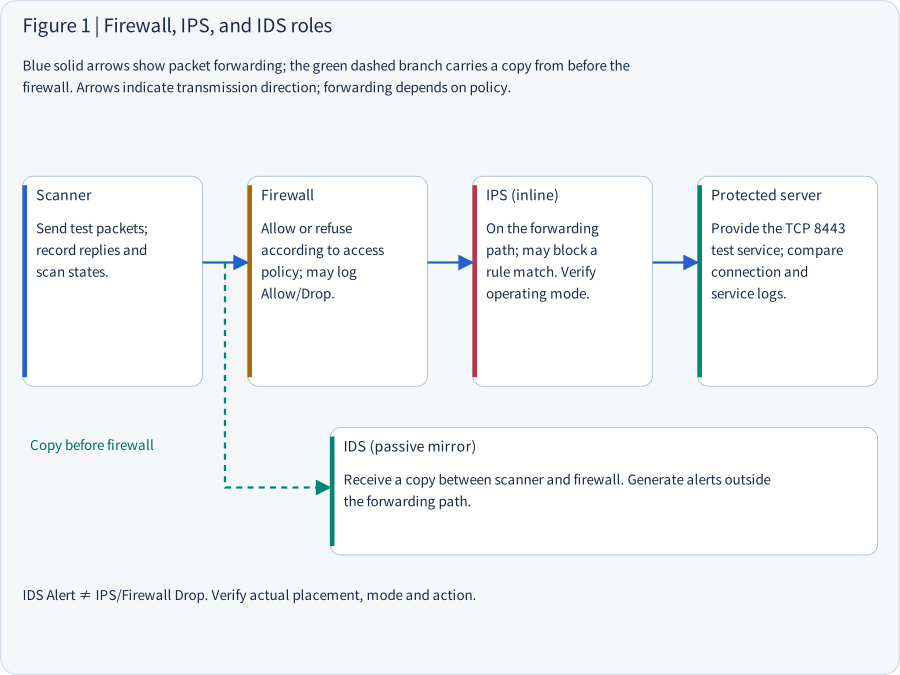
Diagram: the actual roles of Firewall, IPS, and IDS
Read the two paths separately: blue solid arrows show the packet-forwarding path; the green dashed path shows the copy delivered to IDS. If IPS drops a packet, the server may not receive it. Whether IDS can observe that packet depends on where mirroring occurs.
Blue solid arrows show packet forwarding; the green dashed branch carries a copy from before the firewall. Arrows indicate transmission direction; forwarding depends on policy.
Scanner
Send test packets; record replies and scan states.
Firewall
Allow or refuse according to access policy; may log Allow/Drop.
IPS (inline)
On the forwarding path; may block a rule match. Verify operating mode.
Protected server
Provide the TCP 8443 test service; compare connection and service logs.
Between Scanner → Firewall ┄→ IDS: copy before the firewall
IDS (passive mirror)
Receive a copy between scanner and firewall. Generate alerts outside the forwarding path.
IDS Alert ≠ IPS/Firewall Drop. Verify actual placement and visibility in the deployed topology.
5. With no alert, check visibility and recording gaps first
5.1 Why does no alert not establish no attack?
A hospital dashboard displays:
Security Alerts: 0This does not establish that no attack occurred. Detection requires observation, analysis, matching, and delivery:
Network traffic
    ▼
① Can the sensor observe it?
    ▼
② Is the detection engine analyzing normally?
    ▼
③ Does a rule match and generate an event?
    ▼
④ Is the alert delivered and displayed?
    ▼
Operator sees an alert
A failure at any stage can leave the dashboard empty.
Problem A: the traffic never passes a visible location
Switch ──┬──► IDS
         └──► Server A

Separate path ─────► Server B
                    (outside IDS visibility)
If traffic targets B while the IDS monitors only A's path, the IDS cannot detect packets it never observes. This is a visibility problem.
Problem B: the sensor receives incomplete data
An overloaded network device may lose mirrored packets. Of 1,000 transmitted packets, the IDS may observe only part of the set. Its analysis can then be incomplete. Check sensor health, packet loss, and data collection as well as alert counts.
Problem C: the traffic is encrypted
Client
   │ HTTPS / TLS
   ▼
Firewall
   ▼
IDS
   ▼
Web server
Without access to plaintext, IDS cannot directly read encrypted application content. It may still observe IP addresses, ports, packet sizes, timing, and whatever handshake information is visible under the protocol and settings. Encryption limits observable content; it does not necessarily make all traffic invisible.
Problem D: detection occurred but the alert was not displayed
Suricata
   ▼
Log collector
   ▼
SIEM
   ▼
Security dashboard
SIEM means Security Information and Event Management. It centralizes, correlates, and analyzes security records. A failure in this delivery chain can hide an alert from the operator even when the IDS detected the event.
How to investigate
| Question | What it checks |
|---|---|
| Which path carried the traffic? | Whether the IDS could observe it |
| Did the sensor receive data? | Mirroring loss or collection failure |
| Was the detection rule enabled? | Whether the intended recognition condition existed |
| Were logs delivered? | Loss during collection or display |
| Are the times consistent? | An incorrect search window |
| Was NAT involved? | Changed source or destination addresses |
These checks are part of operating a SOC, a Security Operations Center. Useful monitoring reliably finds, explains, and handles relevant events; alert volume alone does not establish that capability.
6. Worked example: one test service, two sources
This synthetic tabletop scenario combines the earlier ideas. It is not a record from real security equipment.
6.1 Scenario
Server: 192.0.2.10
Service: HTTPS
Port: TCP 8443
Policy permits the management subnet and denies the external test subnet.
| Computer | Role | Expected policy |
|---|---|---|
| A | Management-subnet test computer | Allow |
| B | External-subnet test computer | Drop |
The task is to verify whether access policy behaves as intended.
6.2 First test: management source A
At 09:00, A performs an authorized connection test against TCP 8443:
8443/tcp openThe server records:
09:00
Connection from A
Destination Port: 8443
The observations support one another:
- A's scan reports open.
- The server records the corresponding connection from A.
This agrees with the allow policy. Check application behavior separately: an open port does not establish successful login or normal business operation.
6.3 Second test: external source B
At 09:02, B tests the same service:
8443/tcp filteredThat line alone does not explain the missing expected response. The firewall records:
09:02
Source: B
Destination: Server
Protocol: TCP
Port: 8443

Rule: FW-17
Action: DROP
The IDS records:
09:02
Signature: Possible Port Scan
Action: ALERT
The server search returns:
09:02
No matching connection from B
We now have four evidence sources:
| Source | Observation | Supported reading |
|---|---|---|
| B's Nmap | filtered | B could not determine the port state |
| Firewall | FW-17 DROP | A corresponding blocking action was recorded |
| IDS | ALERT | Related activity generated a notification |
| Server | No matching connection | The searched records do not show B's connection |
Match time, source, destination, port, and packet path before drawing a conclusion. If they correspond, the evidence supports that this B test traffic was blocked by FW-17 as intended. The IDS action was alert, so it does not establish IDS blocking. Only this source, time, and service were tested, so the evidence does not establish whole-server security.
6.4 Why check NAT and time?
NAT: Network Address Translation
B may originally use:
198.51.100.25After NAT, the firewall might see:
203.0.113.50Searching only the original address may miss the event:
Original source IP
    ▼
NAT
    ▼
Translated IP
    ▼
Firewall log
Correlating network evidence may therefore require address-translation records, rather than one unchanged IP address.
Time synchronization
Suppose the scanner says:
09:02:00But the firewall says:
09:07:00Clock disagreement may make related events appear unrelated. Check time zones, NTP synchronization, and possible clock error.
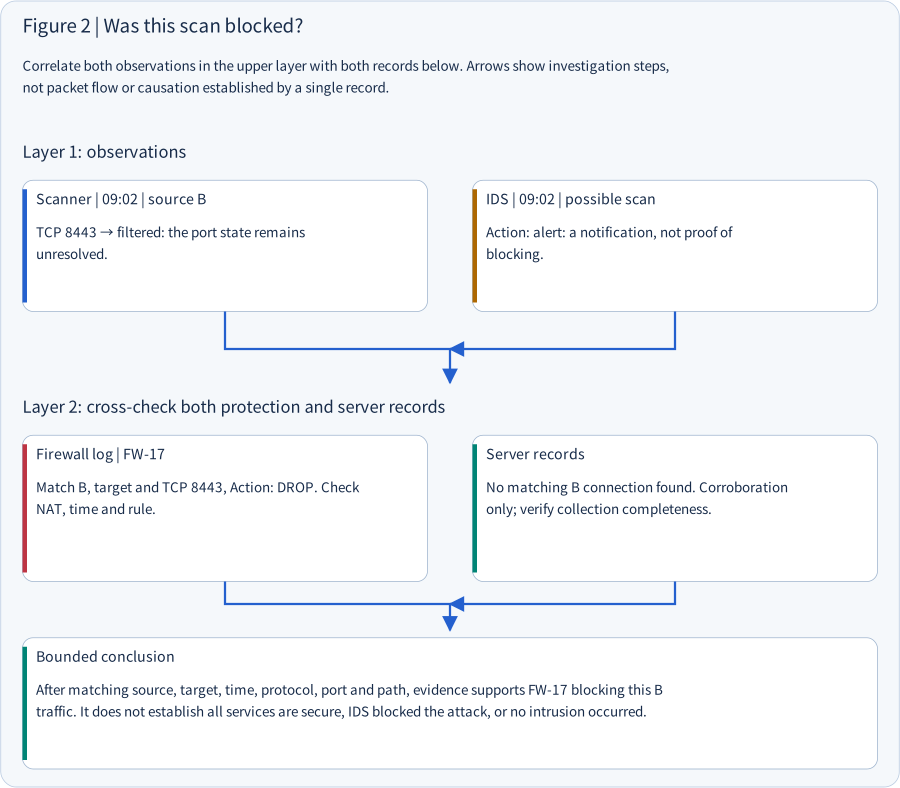
Diagram: cross-check scan results and security records
Start with observations, correlate independent records, then state only the conclusion they support. This method also applies to penetration-test reporting, incident investigation, audit, and network forensics.
Correlate both observations in the upper layer with both records below. Arrows show investigation steps, not packet flow or causation established by a single record.
Layer 1: observations
Scanner | 09:02 | source B
TCP 8443 → filtered: the port state remains unresolved.
IDS | 09:02 | possible scan
Action: alert: a notification, not proof of blocking.
Both observations ↓ cross-check both records below
Layer 2: protection and server corroboration
Firewall log | FW-17
Match B, target and TCP 8443, Action: DROP. Check NAT, time and rule.
Server records
No matching B connection found. Corroboration only; verify collection completeness.
Bounded conclusion
After matching source, target, time, protocol, port and path, evidence supports FW-17 blocking this B traffic. It does not establish all services are secure, IDS blocked the attack, or no intrusion occurred.
7. Defensive work: reduce exposure, preserve detection, verify outcomes
After learning to interpret a scan, consider how you would design protection for a hospital, business, or laboratory.
7.1 First layer: reduce the attack surface
Suppose three laboratory NAS systems provide file sharing, HTTPS administration, SSH remote administration, and backups. Exposing every service directly creates multiple reachable entry points:
Internet
    ├── NAS 1: 443, 22, 445
    ├── NAS 2: 443, 22, 445
    └── NAS 3: 443, 22, 445
IDS does not remove this exposure. First decide which services genuinely need external access. A more controlled design could be:
Internet
    ▼
Authentication and access control
    ▼
Firewall
    ├── Authorized administrator → NAS 1
    ├── Authorized researcher → NAS 2
    └── Authorized backup service → NAS 3
Reduce unauthorized access opportunities through architecture. Apply least privilege at the identity entry point too: passing one login should not grant administration of every NAS. These ideas connect with Cloudflare Access, Zero Trust, and network segmentation.
7.2 Second layer: retain detection
Suppose policy is:
External source → NAS administration → DROPYou still want to notice an accidental policy change. Retain:
- Firewall event records.
- Monitoring of important connection and service activity.
- IDS/IPS health checks.
- Audit records of important configuration changes.
- Verification that alerts reach the monitoring system operators actually use.
Every denied packet need not trigger an immediate notification. Excess low-value alerts can cause alert fatigue and obscure important events. Decide according to risk which events to retain, aggregate, correlate, or escalate immediately.
7.3 Third layer: verify effectiveness
Configuration alone does not establish security. Use authorized tests with expected outcomes. Suppose only the management subnet should reach NAS TCP 8443:
| Test | Source | Target | Expected outcome |
|---|---|---|---|
| T1 | Authorized management subnet | NAS:8443 | Allow |
| T2 | Unauthorized external test subnet | NAS:8443 | Drop |
| T3 | Authorized user | Normal NAS business function | Works normally |
| T4 | Authorized test source | IDS monitoring scope | Intended detection record |
T1 checks that valid management traffic is not wrongly blocked. T2 checks restriction of unauthorized traffic. T3 checks that controls preserve normal work. T4 checks visibility and detection for the specified activity. Effective protection includes both restrictions and legitimate usability.
Prepare an explicit test plan
| Item | Meaning |
|---|---|
| Authorization | Who approved the test |
| Scope | Which devices and subnets may be tested |
| Time Window | Start and finish |
| Test Method | Permitted test methods |
| Expected Result | Expected allow or drop |
| Stop Condition | Conditions requiring a halt |
| Responsible Person | Executor and supervisor |
| Rollback | Recovery if something goes wrong |
Turning off IDS/IPS for convenience changes the conditions and cannot prove normal protection works. If comparing enabled and disabled modes, separately approve and control the tests, and label each condition clearly.
7.4 Writing a defensible conclusion
An overbroad statement would be:
The firewall blocked the attack. The system is secure.
The evidence from section 6 supports a narrower report:
During the approved test window, external test source B tested TCP 8443 on the test server. The scan reported filtered, FW-17 recorded a corresponding DROP, and no matching connection was found in server records. After matching source, destination, time, and network path, the evidence supports restriction of this test traffic by the intended policy. Other services, sources, and times remain outside this test's scope.
This gives the reader a defined scope, traceable evidence, and a conclusion within that evidence. The distinction is useful in penetration-test reporting, hospital security audits, and incident investigation.
8. Safe exercise: read the synthetic records only
Practice evidence interpretation without installing tools or connecting to real equipment.
8.1 Exercise scenario
[Record 1]
Time: 09:00
Source: A
Destination: Test Server
Port: TCP 8443
Nmap Result: open
[Record 2]
Time: 09:02
Source: B
Destination: Test Server
Port: TCP 8443
Nmap Result: filtered[Record 3]
Time: 09:02
Firewall Rule: FW-17
Source: B
Destination: Test Server
Port: TCP 8443
Action: DROP[Record 4]
Time: 09:02
IDS Event: Potential Port Scan
Action: ALERT[Record 5]
Time: 09:02
Server Log:
No matching connection from BAll five records are synthetic exercise material.
8.2 First task: classify evidence sources
| Record | Scanner | Protection/monitoring | Server |
|---|---|---|---|
| Record 1 | ? | ? | ? |
| Record 2 | ? | ? | ? |
| Record 3 | ? | ? | ? |
| Record 4 | ? | ? | ? |
| Record 5 | ? | ? | ? |
Who produced a record affects what it can establish. A scanner describes replies received; its output alone does not establish which internal firewall rule executed.
8.3 Second task: separate facts and inference
Question A: what did we actually observe? Record scan outputs and device records without adding guesses.
Question B: which explanation do these observations support? Check whether time, source, destination, and action correspond.
Question C: what remains unproven? Consider:
- Were other ports covered?
- Does the same policy apply to other sources?
- Does protection work at other times?
- Are the logs complete?
This separates evidence, inference, and limits.
Suggested record template
[Test information]
Purpose:
Authorized scope:
Time and time zone:
Source:
Target:
Protocol / Port:

[Observations]
Scanner:
Firewall:
IDS / IPS:
Server:

[Analysis]
Confirmed facts:
Evidence-supported inference:
Remaining uncertainty:

[Conclusion]
Does this test agree with expected policy?

[Follow-up]
What still needs corroboration?
The template can also support real incident records and technical reports.
9. Quick checks
Try explaining each answer before opening the reference answers at the end.
Question 1: alert and blocking
A scan returns:
8443/tcp filteredThe IDS reports:
Action: ALERTDoes this prove the IDS blocked the connection? Explain why, and identify the evidence you would seek next.
Question 2: different sources and different results
The same server's TCP 443 gives:
Computer A → open
Computer B → filtered
Why can both results be correct?
Question 3: no alerts
A manager sees:
IDS Dashboard
Total Alerts: 0
Monitoring health is unknown. Give two priority checks and explain their purpose.
Question 4: a reasonable test design
An engineer proposes:
Turn off all IPS protection and scan with Nmap. If no problem is found, we have proved the IPS configuration is effective.
What is wrong with the design? How would you change it to evaluate protection?
10. Q&A: common conceptual questions
These are supplementary teaching questions, separate from actual learner-submitted Q&A records.
Q1: if a firewall blocks traffic, why also use IPS?
The controls may inspect different conditions. Traditional firewall policy primarily controls access, while IPS may take prevention action based on threat signatures and detection rules.
For example, the firewall permits public website traffic on TCP 443. That traffic may contain activity matching a threat signature. An IPS can add protection if its position and mode let it inspect and block that content. Modern NGFWs often integrate IPS, so two separate appliances are not always necessary.
Q2: if IPS blocks all port scans, is the server secure?
No. Unresolved scan results leave other risks possible:
- Vulnerabilities in legitimately public services.
- Web application weaknesses.
- Improper authentication or authorization.
- Compromised internal devices.
- Misconfiguration.
- Network paths outside the evaluated coverage.
Port scanning is one part of security assessment.
Q3: can firewall DROP and an IDS alert both be valid?
Yes, depending on placement:
External source
    ├────► IDS (mirror before firewall)
    ▼
Firewall
    └── DROP
IDS may observe a copy before the firewall discards the original. If IDS observes only downstream traffic, do not assume it saw that same discarded packet. It may have seen related packets or received another event feed. Understand the topology rather than relying on two dashboards alone.
Q4: does no firewall DROP log mean no blocking happened?
No. A firewall can omit logging for particular traffic. An absent record and an absent action are different claims. Check logging policy, actual rules, event collection, and other available evidence.
11. Connect M03-08 with earlier CEH concepts
Place the lesson within the M03 learning route:
| Unit | Knowledge | Connection to M03-08 |
|---|---|---|
| M03-01 | IP, TCP, UDP, ports | How packets address a service |
| M03-02 | ICMP, ARP, discovery | Possible device responses |
| M03-03 | TCP Connect, SYN, UDP scans | How scan methods produce results |
| M03-04–05 | Network scanning techniques | Place probes in network context |
| M03-06 | OS fingerprinting | Infer an OS from network replies |
| M03-07 | Nmap and result interpretation | Use tools and preserve original evidence |
| M03-08 | Firewall, IDS, IPS, protection verification | Correlate scan results with control outcomes |
| Next: M04 | Enumeration | Examine reachable service information within authorization |
The concepts form a learning route:
[Understand protocols]
IP / TCP / UDP / Port
    ▼
[Discover devices]
ICMP / ARP
    ▼
[Observe service states]
SYN / TCP Connect / UDP
    ▼
[Collect information with tools]
Nmap
    ▼
[Interpret replies]
open / closed / filtered
    ▼
[Understand controls]
Firewall / IDS / IPS
    ▼
[Correlate evidence]
Scanner / Firewall / IDS / Server
    ▼
[Write a defensible conclusion]
Observation → Inference → Limits → Improvement
M03 builds a method for network security analysis: understand packet generation, transmission, and response, then use independent records to verify protection. This method applies to enterprise networks, hospital systems, laboratory NAS, cloud infrastructure, and incident investigation.
Five English terms to retain
| Term | Meaning | Core idea |
|---|---|---|
| Firewall | Network access control | Enforce traffic policy |
| IDS | Intrusion Detection System | Detect and report suspicious activity |
| IPS | Intrusion Prevention System | Take prevention actions according to rules |
| Visibility | Observable scope | Which traffic the sensor can actually inspect |
| Evidence Correlation | Relating independent records | Combine records to evaluate events and inferences |
Further reading: official documentation
- Nmap — Port Scanning Basics: all six port states.
- Suricata — Rules Format: alert, drop, reject, and other actions.
- Suricata — Thresholding Keywords: alert frequency, thresholds, and actions.
- NIST SP 800-41 Rev.1: firewalls and firewall policy.
- NIST SP 800-94: IDPS fundamentals. This older final guide supports concepts rather than serving as current deployment guidance.
Begin with question 1 in section 9 and compare your reasoning with the reference answer. Reading or opening an answer does not establish learner completion.
Download this edition’s bilingual SVG ZIP
Reference answer: Alerts and blocking
No. Filtered is the scanner's unresolved port-state result; alert is a notification action. Seek protection-action records matching the time, source, destination, and port, such as Drop under rule FW-17, and compare service and path evidence. This can support which control blocked the traffic, without claiming protection for all traffic.
Reference answer: Different observation points
Scan states depend on source, path, time, and method. An internal source may be allowed while an external one is restricted, so both results can be correct. Check comparable targets, methods, and times before comparing source policies. Neither record substitutes for the other.
Reference answer: No alerts
Check whether the traffic passed a location visible to the sensor and whether alerts reached the queried console. Other valid checks include rule enablement, time window, mirrored-data completeness, and sensor health. No alert describes the records currently found; it does not prove no scan or intrusion occurred.
Reference answer: Changed test conditions
Disabling protection changes the conditions being evaluated. It may help establish service connectivity, but cannot validate the original protection. Retain separately approved testing under normal settings, including expected allow and deny cases, and document exceptions, impact, and verified recovery.
Concept Q&A
Pending: related questions will be edited into anonymous teaching notes when available.