CEH M03-07 | Nmap, Scan Settings and Result Interpretation: A Plain-Language Guide
The central idea of this chapter is that Nmap helps you understand which ports are open, what you examined, what you left unexamined, and what the results can actually establish.
This is how operating a security tool develops into performing a defensible security assessment.
This guide builds on the nine sections of CS Kairos Learn — M03-07 and the official Nmap documentation.
1. Build the complete picture: Nmap as a building safety inspector
Imagine that you manage safety in a building.
The building has 100 doors, but today's authorization covers only doors 1 and 2.
Your inspection finds:
- Door 1 can be opened.
- Door 2 cannot be opened.
Can you report that the entire building is safe?
You cannot support that conclusion.
You checked two doors; the other 98 remain unexamined.
Nmap works on the same principle.
Suppose you scan only TCP 8000 and 8001 on one host:
- 8000 is reported as `open`.
- 8001 is reported as `closed`.
You can describe those two TCP port states under the conditions of that scan. You cannot conclude that the entire host has no vulnerabilities.
The complete Nmap workflow
Arrows show work order. Each stage bounds the next; completing a scan does not establish overall security.
- Permission and question
Confirm targets, exclusions, time, source and stop conditions.
- Minimum settings
Choose protocol, ports and method; check each added capability.
- Preserve raw results
Keep command, version, time, responses, warnings and unfinished scope.
- Compare and verify
Check management settings, processes and logs before deciding what follows.
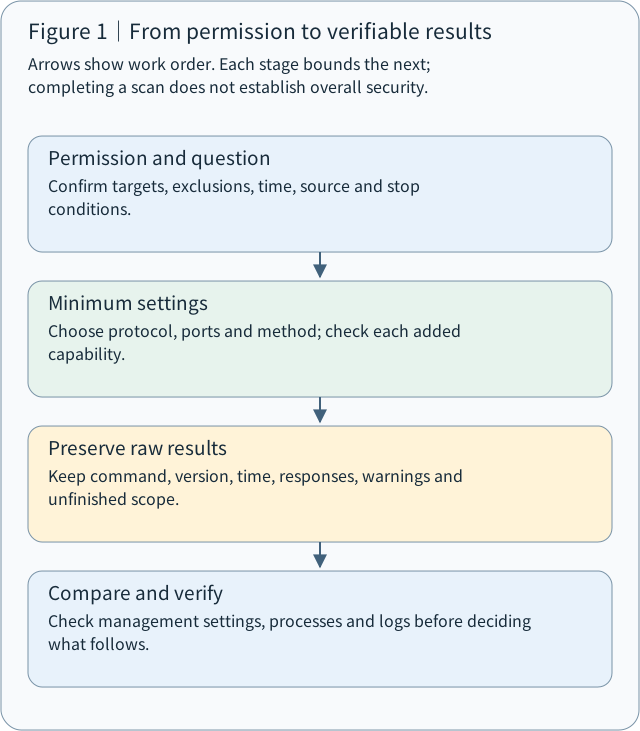
Figure 1 | A traceable security-checking workflow from authorization and measurement to verification
Think of the workflow as four questions:
1. Scope: Which devices am I allowed to examine?
2. Configuration: How will I examine them?
3. Evidence: What did I actually observe?
4. Verification: Which conclusions do those observations support?
These four questions organize M03-07.
2. Authorized scope: having a key does not authorize every room
Suppose you are a hospital security engineer responsible for an environment containing three NAS devices.
Your manager authorizes only TCP 8000 and 8001 on the first NAS, to check whether those two service entry points behave as expected.
Being able to reach the other two NAS devices does not authorize you to scan them as well.
The distinction affects what you may do:
Technical ability does not establish administrative permission.
Before a formal scan, confirm at least the following:
| Item | Plain-language meaning | Example |
|---|---|---|
| Target | What will be examined? | One specified NAS |
| Scope | What is permitted? | TCP 8000 and 8001 |
| Method | How will it be checked? | TCP Connect |
| Source | Where will the check originate? | A laboratory internal-network computer |
| Time Window | When may it run? | The approved maintenance window |
| Stop Condition | What requires stopping? | Service disruption or system alerts |
| Evidence | Where will results be kept? | The designated audit-record directory |
Why record the source location?
Connecting to a NAS from a hospital's internal network and connecting to the same NAS from the Internet may produce completely different results.
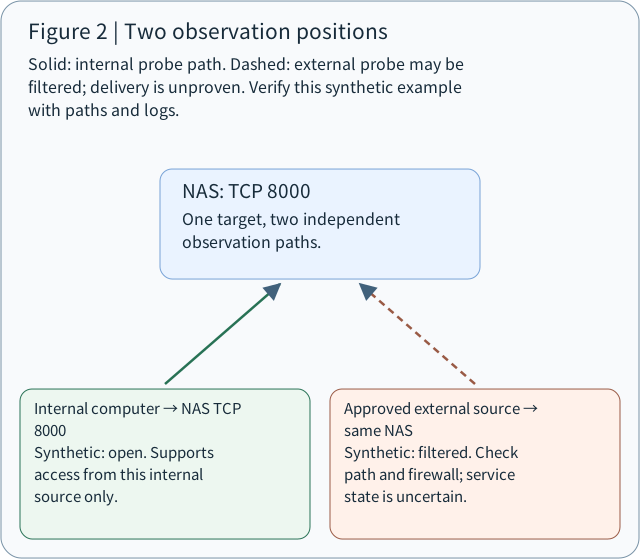
Figure 2 | Illustrative scenario: an internal `open` result does not establish direct external access; `filtered` does not establish that the service is shut down.
This connects to M03-02 and M03-03: packets traverse different paths, and firewalls may apply different rules to different sources.
Interpret every scan result together with its source, time and method.
Solid: internal probe path. Dashed: external probe may be filtered; delivery is unproven. Verify this synthetic example with paths and logs.
NAS: TCP 8000
One target, two independent observation paths.
Internal computer → NAS TCP 8000
→ NAS: TCP 8000
Synthetic: open. Supports access from this internal source only.
Approved external source → same NAS
→ NAS: TCP 8000
Synthetic: filtered. Check path and firewall; service state is uncertain.
3. Four scan-setting questions: read an Nmap command
The lesson uses this command:
Lesson example | Local testing
nmap -n -sT -p 8000,8001 --reason -oN lab-check.nmap -oX lab-check.xml 127.0.0.1Break it into eight parts:
| Command element | Plain-language meaning |
|---|---|
| `nmap` | Start Nmap |
| `-n` | Disable reverse DNS name lookups |
| `-sT` | Use TCP Connect scanning |
| `-p 8000,8001` | Examine only these two ports |
| `--reason` | Show the reason for state judgments such as open or closed |
| `-oN lab-check.nmap` | Save normal text output |
| `-oX lab-check.xml` | Save XML output |
| `127.0.0.1` | Examine the local environment running the command |
3.1 `-p`: which doors will I check?
A port lets the operating system deliver network traffic to the corresponding service.
Nmap lets you specify which entry points to examine.
# Examine only TCP 80
nmap -sT -p 80 127.0.0.1

# Examine two TCP ports
nmap -sT -p 8000,8001 127.0.0.1

# Examine TCP ports 8000 through 8010
nmap -sT -p 8000-8010 127.0.0.1
Two other common options:
- `-p-`: examine TCP ports 1 through 65535 when paired with a TCP scanning method.
- `-F`: fast mode examines fewer common ports; it does not simply scan the same port range faster.
Exam point: a port outside the selected range cannot be classified as closed merely because it does not appear in the output.
3.2 `-sT`: how will I knock?
This connects directly to the TCP Connect, SYN and UDP methods in M03-03.
| Method | Plain-language analogy | Core concept |
|---|---|---|
| `-sT` | Knock and establish a complete connection | TCP Connect Scan |
| `-sS` | Knock and check for a response without completing the connection | TCP SYN Scan |
| `-sU` | Send a message and examine the response | UDP Scan |
With `-sT`, Nmap asks the operating system to attempt a TCP connection using `connect()`.
Acceptance generally leads to `open`; explicit rejection, such as an RST, generally leads to `closed`. Filtering that prevents a determination may lead to `filtered`.
A SYN scan that does not complete the TCP three-way handshake may still be detected by IDS, IPS or logging systems.
3.3 `-n`: skip reverse name lookups
Suppose Nmap discovers the host address `192.168.1.10`.
It may perform a Reverse DNS Lookup to try to find a host name.
`-n` tells Nmap to skip that reverse lookup and focus on the specified checks.
It does not remove the need to resolve a domain name supplied as a target, and it does not hide an IP address.
3.4 `--reason`: show the basis of the judgment
Imagine asking a trainee:
“Why do you think this door is closed?”
The trainee replies, “Because I think it is.”
That report is difficult to audit.
`--reason` displays the response information Nmap used to judge a host or port state.
Examples include a TCP RST or TCP SYN/ACK.
You can inspect both the conclusion and the tool's basis for reaching it.
4. Important options: `-sn`, `-Pn`, `-sV`, `-O`, `-A`
These options are easy to confuse because they change different parts of the check.
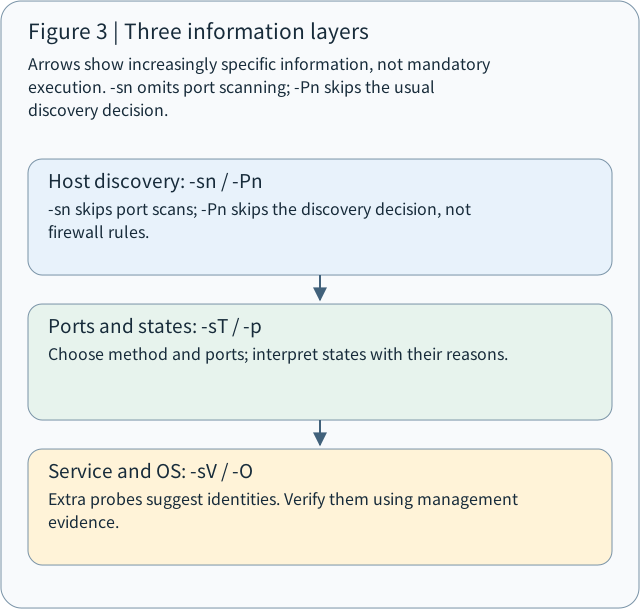
Think of detection as three information layers:
Figure 3 | Three information layers of scanning. Each added layer may require more probes, resources and authorization.
Arrows show increasingly specific information, not mandatory execution. -sn omits port scanning; -Pn skips the usual discovery decision.
- Host discovery: -sn / -Pn
-sn skips port scans; -Pn skips the discovery decision, not firewall rules.
- Ports and states: -sT / -p
Choose method and ports; interpret states with their reasons.
- Service and OS: -sV / -O
Extra probes suggest identities. Verify them using management evidence.
4.1 `-sn`: discover hosts without a port scan
nmap -sn 127.0.0.1This option means:
“Determine whether the target responds; do not perform a port scan this time.”
Think of checking for a response at the building entrance rather than inspecting the doors inside.
A report produced with `-sn` cannot claim that every port was examined.
4.2 `-Pn`: attempt the scan without first establishing host availability
nmap -Pn -sT -p 8000,8001 127.0.0.1Normally, Nmap performs host discovery before deciding whether to continue scanning.
`-Pn` skips the usual discovery decision and treats specified targets as candidates for the subsequent scan.
It is like a manager saying:
“Proceed directly to the approved doors without first checking whether anyone is in the building.”
Remember two limits:
- `-Pn` does not prove that a host is alive.
- `-Pn` does not bypass a firewall.
On a local network, lower-level communication may still require ARP to obtain the next hop's MAC address.
4.3 `-sV`: identify the service being provided
nmap -sT -sV -p 8000 127.0.0.1Suppose you know TCP 8000 is open but do not know which program is listening.
`-sV` attempts to identify the service and version.
This connects to Service Fingerprinting in M03-05.
Keep these facts separate:
8000 is a port number; the service name and version need their own evidence.
Without version probing, the `SERVICE` field may come from the common-port database. That name alone does not establish the software's actual identity.
4.4 `-O`: attempt operating-system identification
sudo nmap -O -p 8000,8001 127.0.0.1This parameter example requires separate authorization for OS probing. `-p` selects the port-scan list; `-O` may add TCP, UDP and ICMP probes, so this is not the original two-TCP-entry experiment. Nmap: OS probing methods
The uppercase `O` means OS Detection.
Nmap examines response characteristics from different probes to infer the target's operating-system family.
Examples include Linux, Windows and FreeBSD.
This extends the operating-system fingerprinting discussion in M03-06.
The inference may be wrong, especially when firewalls, NAT or particular network devices affect the observations. Verify it using administrator-side information.
4.5 `-A`: enable several additional checks together
This parameter is easy to misinterpret.
`-A` does not guarantee greater accuracy for an otherwise unchanged scan.
It enables additional capabilities, including:
- `-sV`: service-version detection.
- `-O`: operating-system detection.
- `-sC`: default NSE script scanning.
- `--traceroute`: route tracing.
Some capabilities may need extra privileges. Default scripts may interact more extensively with services, so use them within the approved scope.
CEH memory point: `-A` groups additional detection features. It is neither an accuracy guarantee nor a timing parameter.
5. Scan speed: faster does not guarantee better measurement
This section explains Timing, Timeout and Retry.
Imagine calling a friend.
You wait two seconds and conclude that the friend is not at home.
The friend may simply not have reached the telephone yet.
Network scanning has the same waiting problem.
Three key concepts
| Term | Plain-language meaning |
|---|---|
| Timeout | How long to wait before treating the expected response as missing |
| Retry | How many additional attempts to make when no response arrives |
| Timing Template | A preset governing waiting, parallelism and other timing behavior |
Nmap has six common timing templates:
| Option | Name | General idea |
|---|---|---|
| `-T0` | Paranoid | Very slow |
| `-T1` | Sneaky | Slow |
| `-T2` | Polite | More conservative |
| `-T3` | Normal | Normal default |
| `-T4` | Aggressive | More aggressive |
| `-T5` | Insane | Very aggressive |
For example:
nmap -sT -T3 -p 8000,8001 127.0.0.1`-T3` is a timing setting, not a safety level.
If the waiting period is too short, Nmap may give up before a response arrives, causing omissions or reducing confidence in the interpretation.
A very high probing rate can also increase network or service load.
For formal work, record the template, timeout and retry limits, and any interruption.
6. Saving results: why a screenshot is insufficient
Suppose a security report contains only a screenshot showing `8000/tcp open`.
A manager may ask:
“When did you scan it, from which computer, using which method, and were there any errors?”
The screenshot usually cannot answer all of these questions.
Nmap therefore provides several output formats.
| Parameter | Format | Main purpose |
|---|---|---|
| `-oN` | Normal text | Human reading and checking |
| `-oX` | XML | Programmatic parsing and automated comparisons |
| `-oA` | Three formats | Produce `.nmap`, `.xml` and `.gnmap` together |
The older `.gnmap` grepable format is deprecated for new integrations. Prefer XML for automated processing.
A scan record that can be audited
At minimum, keep the following information:
Nmap scan worksheet
Example
| Record field | Example |
|---|---|
| Target | `127.0.0.1` |
| Protocol | TCP |
| Ports | 8000 and 8001 |
| Method | TCP Connect |
| Execution location | Local laboratory environment |
| Time | Actual start/end times and time zone |
| Nmap version | Actual version number |
| Original evidence | Text and XML files |
| Other records | Full command, warnings, errors and interruptions |
| Not examined | Other ports, UDP and external paths |
Preserve original data before preparing the analytical report.
For external sharing, create a separate redacted copy rather than modifying the only original evidence.
7. Interpreting results: observation, inference and verification
The distinction between tool observation, inference and verified facts guides technical interpretation in M03-07.
The lesson provides a synthetic case:
Target: localhost in an isolated laboratory environment
Scan: TCP Connect

PORT       STATE
8000/tcp   open
8001/tcp   closed
This is an interpretation exercise, not an actual scan result.
7.1 What does `open` establish?
When Nmap displays:
8000/tcp openUnder that scan's conditions, Nmap judged that a service accepted connections on TCP 8000.
That result alone does not establish:
- Whether the protocol is HTTP, HTTPS or something else.
- The actual service version.
- Whether the service has a vulnerability.
- Whether an attacker can exploit it to gain privileges.
- Whether users on the Internet can reach it.
Each requires additional verification.
7.2 Distinguish `closed` from `filtered`
Use a security guard at a doorway as an analogy:
| State | Analogy | Technical meaning |
|---|---|---|
| `open` | Someone answers and accepts visitors | A service accepts this connection probe |
| `closed` | Someone explicitly says the door is unavailable | The response indicates no service listening for this probe |
| `filtered` | You cannot get past an obstruction to check the door | Filtering or related effects prevent determining whether the port is open |
| `open|filtered` | Someone may be silent, or the message may be blocked | Some methods cannot distinguish open from filtered |
These are conceptual analogies; actual classification depends on the scan method and network responses.
That is why `filtered` cannot be treated as `closed`.
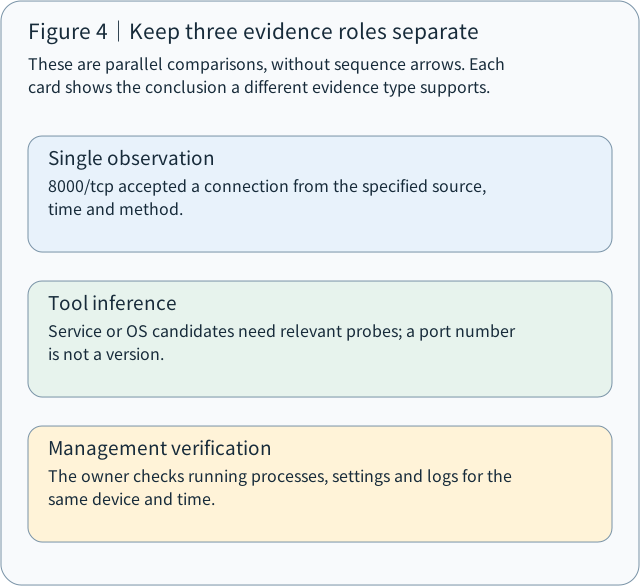
7.3 Three evidence layers
These are parallel comparisons, without sequence arrows. Each card shows the conclusion a different evidence type supports.
- Single observation
8000/tcp accepted a connection from the specified source, time and method.
- Tool inference
Service or OS candidates need relevant probes; a port number is not a version.
- Management verification
The owner checks running processes, settings and logs for the same device and time.
This framework is useful in both research and security audits:
| Evidence layer | Example | Supported conclusion |
|---|---|---|
| Direct observation | TCP 8000 is open | This test observed an entry point accepting connections |
| Tool inference | `-sV` suggests a particular HTTP server version | A possible service identity requiring verification |
| Administrator verification | An administrator checks processes, configuration and logs | Cross-check the actual service, version and configuration |
Keep these layers distinct.
In research, this corresponds to Measurement, Inference and Validation.
8. Use Nmap in a defensive acceptance check
Consider a laboratory with three NAS devices and this requirement:
“NAS administration interfaces should be available only to internal management computers; external networks must not connect directly.”
Running Nmap alone does not establish acceptance.
A fuller process is:
1. Define expected behavior.
Specify which sources should connect and which should not have direct access.
2. Measure from approved locations.
Save separate results from internal and approved external test positions.
3. Compare firewall and administrator-side logs.
Check whether observations match the intended rules rather than relying solely on open or filtered labels.
4. Adjust and retest.
Have administrators correct unexpected exposure, repeat under comparable conditions, and confirm that required services still work.
If remote access uses Cloudflare Tunnel and Access, also verify authentication, authorization for each NAS and application-access rules. A port scan of a NAS IP does not replace access-control testing of an application behind a Tunnel.
This connects scan observations to a meaningful defensive acceptance decision.
9. Run a safe experiment on your own Ubuntu system
The original lesson used a paper interpretation exercise. This additional experiment targets only local `127.0.0.1` so that you can observe the workflow.
Purpose: create your own service and observe open, closed and original evidence.
Step 1: create a clean test directory
Environment: your own Ubuntu system with Python 3 and Nmap installed. Confirm that TCP 8000 is free. If another service uses 8001, retain the observation without stopping unrelated programs. Stop and retain records if unexpected services, warnings or errors appear. All commands below target loopback only.
In the first Ubuntu terminal, enter:
mkdir -p ~/nmap-local-demo
cd ~/nmap-local-demo
python3 -m http.server 8000 --bind 127.0.0.1
This starts a simple HTTP server listening on local TCP 8000.
Keep that terminal open.
Step 2: run Nmap in a second terminal
First check whether Nmap is installed:
nmap --versionIn the second terminal, change to the same directory. Confirm that these output names are unused to avoid overwriting earlier evidence:
cd ~/nmap-local-demoRun:
nmap -n -sT -p 8000,8001 --reason \
  -oN lab-check.nmap \
  -oX lab-check.xml \
  127.0.0.1
Assuming nothing else uses 8001, you may see output resembling:
PORT       STATE    SERVICE
8000/tcp   open     http-alt
8001/tcp   closed   vcom-tunnel
The `SERVICE` names may be port-database labels; they do not establish that `-sV` verified the service identities.
Your actual output depends on your local environment.
Step 3: inspect the original records
cat lab-check.nmapThen inspect XML:
head -n 30 lab-check.xmlCompare the formats.
Step 4: stop the service and scan again
Return to the first terminal and press `Ctrl+C` to stop the HTTP server.
In the second terminal, run:
nmap -n -sT -p 8000,8001 --reason -oN lab-after.nmap -oX lab-after.xml 127.0.0.1If no other program takes over port 8000, you should observe it change from `open` to `closed`.
This exercise lets you observe:
Service-state change → network-response change → Nmap interpretation change.
It also explains why scan time, source and execution environment belong in the record.
Cleanup: confirm that the first terminal's HTTP server has stopped. Retain both text/XML pairs according to your evidence needs. Keep only practice data in the test directory so the HTTP server cannot inadvertently serve other files.
10. CEH M03-07 one-page review
| Command or concept | Meaning to remember |
|---|---|
| `-p` | Specify the ports to scan |
| `-p-` | Scan ports 1–65535 for the selected protocol |
| `-F` | Fast mode using fewer common ports |
| `-sT` | TCP Connect Scan |
| `-sS` | TCP SYN Scan |
| `-sU` | UDP Scan |
| `-sn` | Host discovery without port scanning |
| `-Pn` | Skip the usual host-discovery decision and continue scanning |
| `-sV` | Service-version detection |
| `-O` | Operating-system detection |
| `-A` | Enable several advanced scanning capabilities |
| `-n` | Disable reverse DNS lookups |
| `--reason` | Display reasons for state judgments |
| `-T0`–`-T5` | Timing templates |
| `-oN` | Save normal text output |
| `-oX` | Save XML output |
| `-oA` | Save three output formats together |
Official additional reading: Nmap Reference Guide, Nmap Host Discovery, Nmap Output.
Understanding check: three practical scenarios
Think through these before opening the lesson's reference answers.
Question 1 | Scan scope
You scanned only TCP 8000 and 8001, and both were closed. A manager asks whether the host has no network services at all. How would you answer?
Question 2 | Scan settings
A colleague says `-Pn` bypasses firewalls and `-A` guarantees completely accurate results. What is wrong with each claim?
Question 3 | Defensive acceptance
An internal scan of NAS TCP 8000 reports open, but an external scan reports filtered. How would you explain this, and which two follow-up checks would you propose?
When reading any Nmap result, practice explaining how it was obtained, which conclusions its evidence supports, and which facts remain unknown.
That ability carries into CEH M04 Enumeration, M05 Vulnerability Analysis, penetration testing and security auditing.
Official references
Nmap: port states; scan methods; port selection; additional capabilities; timing and performance; service detection; OS detection.
Reference answer: Do two ports represent the whole host?
No. The evidence covers the specified source, time, TCP method and ports 8000/8001. Other TCP ports, UDP and other observation positions are outside this record. Write “Neither of the two specified TCP ports was observed open in this test,” and list the untested scope. Do not convert that into a host-wide absence of services.
Reference answer: What do -sn and -Pn do?
-sn performs host discovery without a port scan. -Pn skips the usual discovery decision and places specified targets into subsequent scanning. Neither option by itself is evidence of liveness; inspect actual responses and classification reasons. -Pn neither makes a powered-off device alive nor automatically passes a firewall. Local operation can still involve ARP address resolution.
Reference answer: What should be checked before adding -A?
Check whether the approved purpose covers version detection, OS identification, default scripts, traceroute and the associated target, load, timing and stop conditions. -A expands the feature set, rather than merely increasing the accuracy of the same two-port connection test. It is not a timing template. If the goal is only endpoint connectivity, retain the minimum necessary method.
Reference answer: How should open and filtered be compared?
Keep both raw results with source position, time, target, protocol, port, method, version and warnings. Compare firewall and service logs to investigate path or condition differences. Open supports accepting connections as observed by that test; filtered means the test could not determine whether the port was open. Before verification, do not rewrite the difference as service shutdown or successful intrusion.
Concept Q&A
Pending: related questions will be edited into anonymous teaching notes when available.