CEH v13 | M03-06 Operating-System Fingerprinting
Plain-language teaching: how can network packets suggest which operating system a remote device uses?
Even when a computer does not announce whether it runs Windows, Linux or another operating system, the way it responds to network packets may provide clues.
This technique is called OS Fingerprinting. A fingerprint provides an inference; it does not establish the exact operating-system version.
This chapter follows the nine main teaching sections of the original M03-06 lesson, with everyday analogies, mechanisms, packet examples and connections to earlier CEH topics.
Overview: why identify the operating system?
Imagine that you are a security engineer investigating a company server. You know its IP address is 192.168.1.100 and that TCP ports 22, 80 and 443 are Open. These observations identify service entry points, but they do not tell you whether the machine runs Windows Server, Ubuntu Server or a specialized network-device OS. OS fingerprinting helps develop that hypothesis.
Connections to earlier CEH chapters
| Chapter | Topic | Question it helps answer |
|---|---|---|
| M03-01 | IP, TCP, UDP and ports | How does network communication work? |
| M03-02 | ICMP, ARP and host discovery | Which devices may be present? |
| M03-03 | TCP and UDP port scanning | Which ports appear open or closed? |
| M03-04 | Interpreting scan results | Why can the same port produce different results? |
| M03-05 | Service version detection | What service operates at this port? |
| M03-06 | OS fingerprinting | Which operating system might produce these responses? |
The topics connect into an investigation:
Target: 192.168.1.100
        |
        v
1. Host discovery -> Does a device respond?
        |
        v
2. Port scanning -> TCP 22, 80, 443 Open
        |
        v
3. Service detection -> SSH / HTTP / HTTPS
        |
        v
4. OS fingerprinting -> Linux-like? Windows-like?
        |
        v
5. Administrator verification -> Confirm the actual OS version
This is a teaching sequence, not a requirement that tools always execute in this order. The following sections explain each part of the fingerprinting judgment.
1 | Everyday analogy: recognizing a receptionist by their response
1.1 Why can packets reveal operating-system clues?
Imagine calling three people. The first says, “Hello, this is Mr. Wang. How can I help?” The second says, “Hi, who would you like to speak to?” The third says, “Hello, IT office. What is the problem?” All three answer a telephone, but their habits differ. After hearing them many times, you might recognize one without hearing a name.
OS fingerprinting applies a similar idea. Consider three computers running Windows, Ubuntu Linux and FreeBSD:
                  Security engineer
                         |
                  Send network packets
                         |
              +----------+----------+
              |          |          |
           Windows     Ubuntu     FreeBSD
              |          |          |
           Response A Response B Response C
              +----------+----------+
                         |
                   Collect features
                         |
               Compare known database
                         |
                    Infer an OS
All three systems implement TCP/IP, but the specifications do not force every implementation detail to be identical. Differences may appear in default TCP parameters, supported TCP options and their order, sequence-number generation, responses to unusual packets, or initial IP settings. Nmap combines such features to suggest an operating system. Nmap fingerprinting methods
1.2 What is a protocol stack?
Earlier TCP, UDP and IP lessons introduced communication protocols: the rules of communication. A device's protocol-stack implementation is the software that carries out those rules.
For example, TCP establishes a connection with a three-way handshake:
Client                         Server
   | -------- SYN -----------> |
   | <------ SYN/ACK --------- |
   | -------- ACK -----------> |
   |    Connection established |
Windows and Linux follow the TCP handshake rules, but their SYN/ACK packets may contain different options or parameters. Those differences give fingerprinting tools material to compare.
The distinction to retain
A protocol is the shared rule set; a protocol-stack implementation is how a particular system executes it. OS fingerprinting recognizes implementation characteristics rather than directly reading an OS name.
A fingerprint is not a unique identity number. Different Linux devices can have similar fingerprints, and updates can change a device's fingerprint.
2 | Active and passive: how do you collect the clues?
Active Fingerprinting and Passive Fingerprinting both examine packets. Their difference is how those packets become available.
2.1 Active fingerprinting: ask questions deliberately
To identify a person, you might ask where they live, how they travel and where they work, then examine the answers. Active fingerprinting similarly creates probes and sends them to a target.
For example, Nmap enables OS detection with:
nmap -OHere nmap is the scanning tool and -O uses an uppercase letter O, not zero. This fragment only illustrates the option; an actual invocation also needs a target and authorization.
Nmap can use TCP, UDP and ICMP probes. It asks more than “Are you there?” It examines how the target responds to one packet, how that response changes for another packet, and what happens at a port without a listening service. The responses together form a fingerprint. Nmap fingerprinting methods
Benefits and limits of active collection
Designing the probes can provide a more complete set of features. It also generates additional traffic. Probes may trigger IDS, IPS or firewall alerts and may burden fragile devices. Identifying an OS therefore still requires permission and a defined scope.
2.2 Passive fingerprinting: observe existing conversations
Instead of calling someone, imagine analyzing existing call records under appropriate authorization. You infer the speaker from their ordinary conversational habits.
Passive network fingerprinting analyzes traffic that was already occurring; it does not send additional probes for the purpose of identifying the OS. For example, an authorized network administrator might observe TCP packets from an Ubuntu client connecting to the company website and compare its stack characteristics.
p0f is a tool associated with passive OS fingerprinting. Passive access does not mean visibility into every packet: switching, routing and capture placement determine what traffic is available.
Active and passive compared
| Aspect | Active | Passive |
|---|---|---|
| Meaning | Active fingerprinting | Passive fingerprinting |
| Everyday analogy | Call and ask questions | Analyze existing conversations |
| Additional probes | Yes | No |
| Can design the probes? | Yes | No |
| Example tool | Nmap -O | p0f |
| Main limitations | Probe traffic, device impact and authorized scope | Available traffic and observation position |
| Authorization required? | Yes | Yes |
What this distinction teaches
Active collection controls an input and observes its output. Passive collection observes naturally occurring inputs and outputs. In research terms, the former resembles a controlled experiment and the latter an observational study.
That analogy does not make active methods automatically more accurate or passive methods automatically safer. Both depend on data quality, environment and authorization.
3 | What does the tool examine? Three groups of clues
The main groups are IP TTL, TCP Window and Options, and responses to different probes. Tools generally compare combinations rather than map one number directly to one OS.
3.1 First group: Time to Live (TTL)
What is TTL?
TTL is a field in the IPv4 header that limits continued forwarding. Imagine sending information from Yilan to Taipei through several routers:
Source: TTL 64
      |
Router A: TTL 63
      |
Router B: TTL 62
      |
Router C: TTL 61
      |
Destination
This illustration assumes a decrement of one at each router. IPv4 routers decrement TTL during forwarding; a packet cannot continue forwarding after its TTL is exhausted. This prevents a routing loop from circulating packets indefinitely. RFC 791
Why can TTL help identify an OS?
Systems and network devices may choose different initial TTL settings, such as 64 or 128. Suppose a captured packet contains:
Source IP: 192.168.1.100
TTL: 61
You might hypothesize an initial TTL of 64 followed by three router decrements:
64 − 3 = 61
But the initial value is not known to be 64. TTL 61 therefore does not prove Linux. Administrators can change the initial value, and device type and network conditions affect interpretation.
Another common misunderstanding
Consider a scanner sending a SYN and receiving a SYN/ACK:
Scanner ------- SYN -------> Server
Scanner <---- SYN/ACK ------- Server
The TTL in the received SYN/ACK concerns the response's journey from the device that generated it back to the observation point. It is not the TTL of the outbound SYN when that probe reached the server. Identify the packet and its direction before reasoning about hop counts.
Subsection conclusion
TTL is useful evidence, but it cannot identify an OS by itself. Consider the initial value, forwarding distance, response origin and other packet features together.
3.2 Second group: TCP Receive Window
What is the TCP Window?
TCP provides reliable, ordered transfer and flow control. The receive window participates in flow control. Imagine moving boxes into a warehouse with room for ten more boxes. You tell the mover, “I can accept ten more.”
Sender                         Receiver
   | <---- Window = 4000 ----- |
   | Receiver advertises room  |
   | for up to 4000 bytes      |
   | ------ Data ------------> |
More precisely, the receiver advertises a sequence-space range of data it can accept; that range changes as its buffers are used. It is neither the computer's total RAM nor its network bandwidth.
TCP Window Scaling expands the representable window, so packet interpretation must account for negotiated scaling. The Window field in SYN and SYN/ACK packets themselves is not scaled; negotiated scaling applies to later packets. RFC 7323
Why can a receive window help identify an OS?
TCP implementations can use different initial settings and behavior. Consider these synthetic devices:
| Feature | Device A | Device B |
|---|---|---|
| Initial Window | 64240 | 65535 |
| Window Scale | Present | Present |
| TCP Timestamp | Present | Absent |
| TCP option order | Combination A | Combination B |
These values illustrate differences; they do not label particular operating systems. Both devices use TCP, but the combination of settings differs. Such combinations contribute to a fingerprint.
3.3 Second group continued: TCP Options
The basic TCP header includes source and destination ports, sequence and acknowledgment numbers, and other fields. Additional options are like optional features selected on a shared application form.
| TCP option | Meaning | Plain-language explanation |
|---|---|---|
| MSS (Maximum Segment Size) | Maximum segment size | Advertises the largest TCP data segment the endpoint can receive |
| Window Scale | Window scaling | Allows larger receive windows |
| SACK Permitted | Selective acknowledgment permitted | Enables more precise reporting of received data ranges |
| Timestamp | Timestamp option | Supports functions including round-trip measurement |
| NOP | No Operation | Supports option layout and alignment |
The presence and order of options can be clues. Two synthetic SYN/ACK examples might look like this:
Device A:
TCP Options:
MSS
SACK Permitted
Timestamp
Window Scale

Device B:
TCP Options:
MSS
Window Scale
SACK Permitted
Both comply with TCP, yet select or arrange options differently. This may reflect different stack implementations. Options alone still do not confirm an OS; Nmap combines information from multiple probes, including options and windows. RFC 9293
3.4 Third group: responses to different probes
Window and Options occupy two subsections but belong to the second group. The third group connects earlier TCP and ICMP knowledge to response behavior.
Imagine visiting a company office. A normal request may be accepted, an invalid application rejected, and an unusual question answered with an error or no answer. Different reception desks handle exceptions differently; operating systems may also respond differently to unusual packets.
| Probe | Behavior of interest |
|---|---|
| TCP SYN | How does the system begin handling a connection? |
| TCP ACK | How does it respond to a particular ACK probe? |
| Unusual TCP flag combination | How does it handle an unusual packet? |
| ICMP Echo | How does it answer an ICMP probe? |
| UDP probe | What error response and fields are returned? |
A SYN to a TCP port without a listener commonly produces RST. Fingerprinting examines more than the presence of that RST: it can compare other response fields and details. The combination may distinguish implementations.
Which data does Nmap actually use?
Nmap's IPv4 fingerprinting documentation describes SEQ for sequence-related properties, OPS for TCP options, WIN for windows, IE for ICMP Echo features, ECN for Explicit Congestion Notification, T1–T7 for different TCP responses, and U1 for a UDP response. These groups collectively form the fingerprint. Nmap methods
You need not memorize every test now. Understand that multiple features contribute together. Recognizing handwriting similarly involves several characters, spacing and slant rather than treating one written character as conclusive identity evidence.
More complete features can help, but features may be correlated or jointly altered by an intermediary. More features do not guarantee more accurate identification.
4 | Why look for both Open and Closed ports?
This section connects OS fingerprinting to the TCP SYN scanning introduced in M03-03.
4.1 Open: a service accepts connections
Suppose TCP 443 provides HTTPS:
Client                         Server
   | ---- SYN / 443 ---------> |
   | <------ SYN/ACK --------- |
   | Observation supports Open |
A listening service normally leads to SYN/ACK, which contains TCP features useful for fingerprinting.
4.2 Closed: no service accepts the connection
Suppose no program listens on TCP 65000:
Client                         Server
   | ---- SYN / 65000 -------> |
   | <-------- RST ----------- |
   | Observation supports Closed
A valid RST to a normal SYN probe commonly supports Closed. An intermediate firewall can also generate a response, so response origin still matters.
4.3 Why are both useful?
Learning someone's habits only from accepted requests gives less information than observing both acceptance and rejection. Open-port responses provide one set of stack characteristics; closed-port responses provide another. Finding at least one open TCP port and one closed TCP port generally improves Nmap OS detection. Nmap OS detection
What if there is an Open port but no Closed port?
Nmap may still attempt identification and warn that the conditions are weaker. A warning may look like:
Warning: OS detection will be MUCH less reliable
because we did not find at least 1 open
and 1 closed TCP port
This means that the probe set lacks ideal evidence. It does not mean the target has no operating system.
What about Filtered?
Filtered means this probe cannot establish whether the port is open or closed because filtering or other conditions prevent a decisive result. For example:
Client                 Firewall             Server
   | ---- SYN --------> |                      |
   |                    X packet discarded     |
   | waits; no decisive response is obtained   |
The scanner cannot observe the server's possible response in this scenario. Filtered should not be treated as Closed.
4.4 Three easily confused Nmap options
| Option | Main function | Question |
|---|---|---|
| -O | OS detection | Which OS might the endpoint use? |
| -sV | Service version detection | Which service and version are present? |
| -A | Several advanced detection features | Can several kinds of identification be collected together? |
-A also enables default NSE script scanning and traceroute. It is not another spelling of -O. For exam recognition, distinguish -O for OS detection from -sV for service version detection.
5 | How should a match percentage be read?
Consider this synthetic result:
OS Candidate:
Linux-like System: 95%
FreeBSD-like System: 82%
Does the first score mean there is a 95% real-world probability that the target runs Linux? It cannot be read that way without further justification.
5.1 Similarity is not a calibrated probability
Imagine comparing twenty handwriting features and finding nineteen matches:
19 ÷ 20 × 100% = 95%
This example measures the fraction of matching features. It does not establish a 95% probability that a particular person wrote the sample. Many people may share features, and different features may have different identification power.
5.2 How does Nmap compare fingerprints?
For the documented IPv4 method, Nmap compares the collected fingerprint with reference samples in nmap-os-db. Tests have different weights. A simplified description is:
Match Score = matched feature weight ÷ total comparable feature weight
If comparable tests have total weight 100 and matched tests contribute 95, the score is:
Match Score = 95%
That is a close match to one database reference. It is not, by itself, a statistically calibrated guarantee of 95% correctness in deployment. IPv6 OS classification uses a different method, so do not assume that every OS score comes from this formula. Nmap matching algorithms
5.3 Why can identification be wrong?
An Ubuntu administrator may have changed network parameters. A proxy or another intermediary may be in the path. A new OS version may have insufficient representation in the reference database. Any of these can affect the result.
A tool may report:
No exact OS matches for hostThis means it did not find a sufficiently exact known fingerprint in this observation. It establishes neither the absence of an OS nor the safety of the device.
The professional judgment to practice
“Confirmed Linux, 95% confidence” can overstate the evidence. A more defensible report is: “The OS fingerprint closely matches known Linux-like characteristics, with a tool-reported match score of 95%. Administrator-side evidence has not yet confirmed the actual OS and version.”
Keeping a tool inference separate from a verified fact matters in penetration testing, forensics and security audits.
6 | Are you identifying the frontend or the backend?
An IP address does not necessarily identify one server. Websites may use reverse proxies, load balancers and firewalls. The OS inferred from external packets may therefore differ from the OS running the application.
6.1 An everyday analogy
When you telephone a hospital, a switchboard operator may answer before transferring the call to a doctor:
You -- telephone call --> Hospital switchboard
                                  |
                             transfer call
                                  |
                                Doctor
If you identify someone by their opening response, you observe the operator first, not necessarily the doctor. A reverse proxy creates a comparable distinction between visible roles.
6.2 What is a reverse proxy?
Suppose server A is an Nginx reverse proxy and server B runs the website application. The visitor connects to A; A obtains content from B:
External visitor
      | HTTPS request
      v
Server A: Reverse proxy
Accepts the external TCP connection
      | Separate internal connection
      v
Server B: Application server
Runs the website application
If A terminates the external TCP connection and establishes another TCP connection to B, the externally observed TCP fingerprint generally reflects A's stack. HTTP content may nevertheless come from B.
What can this look like?
Assume A runs Linux and B runs Windows Server. OS fingerprinting might suggest:
OS Guess: LinuxService detection might encounter:
Server: Microsoft-IISThese observations need not conflict. They can describe different layers and devices:
Scanner
   |
A: Linux reverse proxy       <- possible TCP fingerprint source
   |
B: Windows / IIS web server  <- possible HTTP service-info source
A proxy can also modify the HTTP Server header. Determine which device and layer produced each piece of evidence before accepting the attribution. Nmap distinguishes stack fingerprints from OS clues obtained through service detection. Nmap OS detection
6.3 How does NAT differ from a reverse proxy?
NAT translates addresses or ports. It does not necessarily terminate the TCP connection:
External client
      | TCP connection
NAT gateway: rewrites address information
      |
Internal server: processes TCP
When a NAT device only translates and forwards packets, TCP replies may still originate from the internal server's stack. This differs from a TCP-terminating reverse proxy.
| Device or mechanism | Main role | Fingerprinting implication |
|---|---|---|
| NAT | Translate IP or port information | Does not necessarily change the OS source being identified |
| TCP reverse proxy | Accept a connection and create a backend connection | External TCP fingerprint generally reflects the proxy |
| Load balancer | Distribute traffic among servers | Depending on mode, the fingerprint can reflect the balancer or different backends |
| Firewall | Filter, allow or reject traffic | Can hide or alter probe results |
For example, a firewall may answer with RST on behalf of a target. Some observed responses would then originate from that firewall rather than the intended host. Intermediaries are among Nmap's documented causes of misleading identification. Nmap identification limitations
The central question
In addition to asking which OS a result displays, ask who generated the packet. That question connects the inference to the actual network architecture.
The existing frontend/backend TCP diagram accompanies this section.
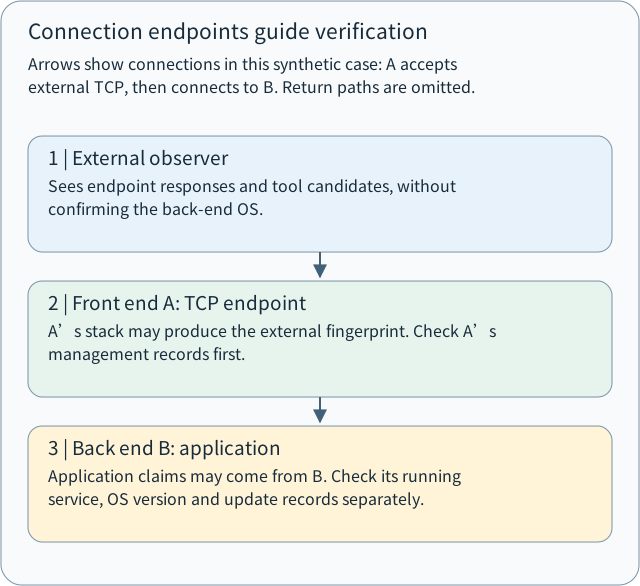
Arrows show connections in this synthetic case: A accepts external TCP, then connects to B. Return paths are omitted.
- 1 | External observer
Sees endpoint responses and tool candidates, without confirming the back-end OS.
- 2 | Front end A: TCP endpoint
A’s stack may produce the external fingerprint. Check A’s management records first.
- 3 | Back end B: application
Application claims may come from B. Check its running service, OS version and update records separately.

7 | Complete synthetic case: from resemblance to verification
Suppose a company authorizes you to assess a web service in an isolated test environment:
Security engineer
       |
192.168.1.100
Frontend A
       | Reverse proxy
192.168.1.200
Backend B
A accepts external TCP connections and connects separately to B. This is a synthetic teaching scenario, not a real scan result.
7.1 Stage one: collect port observations
The record is:
Host: 192.168.1.100

PORT       STATE
443/tcp    open
65000/tcp  closed
TCP 443 appeared Open under these test conditions, supporting a service accepting connections at that entry point. TCP 65000 appeared Closed, with a response supporting that classification and no listener at that entry point. The exact OS is still unknown.
7.2 Stage two: collect packet characteristics
The tool also records:
IP TTL: 61

TCP Window:
  Window field collected

TCP Options:
  Options and their order collected
TTL 61 is an observation. Window and option information are additional feature groups that may assist identification. None of these alone proves the operating system.
7.3 Stage three: compare the OS fingerprint
The tool returns:
OS Candidate:
System Family A
The responses resemble that family in the reference database. This remains an inference, not a verified OS inventory entry.
7.4 Stage four: identify the service
The web response contributes:
Application: BThe tool now has an OS-family-A candidate and application-B information. They are not necessarily contradictory: the architecture document says frontend A terminates external TCP while backend B supplies the application.
One hypothesis is that the TCP fingerprint describes frontend A and the application information comes from backend B. Administrator-side confirmation is still needed.
7.5 Stage five: create an evidence record
Separate what was directly observed, what was inferred or documented, and what still needs confirmation:
| Category | Record in this case | Evidence meaning |
|---|---|---|
| Direct observation | TCP 443 Open | This probe found an accepting entry point |
| Direct observation | TCP 65000 Closed | This probe obtained a closed result |
| Direct observation | TTL 61 | A feature of a received packet |
| Tool inference | System Family A | Similarity to a reference OS fingerprint |
| Architecture document | A terminates external TCP | Helps attribute the fingerprint |
| Pending confirmation | A's actual OS | Requires administrator verification |
| Pending confirmation | B's application and OS | Requires checking the execution environment |
| Pending confirmation | Patching on A and B | Requires version, package and update records |
A report could state:
At the recorded observation point and time, the frontend's TCP 443 appeared Open and TCP 65000 Closed; TTL and TCP-option features were collected.
The fingerprinting tool proposed System Family A as a candidate.
The architecture document states that frontend A terminates external TCP. Its system should therefore be checked first against the fingerprint. The origin of application-B response information needs separate confirmation.
Administrator-side evidence has not yet established the complete OS versions, running kernels or patch status of both devices.
This record makes the observations visible, separates the tool's inference, and identifies the missing evidence.
What should the administrator verify?
If A is an Ubuntu server, its administrator can inspect distribution information with:
cat /etc/os-releaseAn illustrative output is:
NAME="Ubuntu"
VERSION_ID="24.04"
Inspect the running Linux kernel with:
uname -rInspect local TCP listeners and associated processes with:
sudo ss -lntpThese commands answer different questions:
| Command | Evidence sought |
|---|---|
| cat /etc/os-release | Linux userspace distribution information |
| uname -r | Currently running kernel version |
| ss -lntp | Local TCP listening state and associated processes |
Inside a container, /etc/os-release may describe the container distribution while uname -r generally describes the shared host kernel. None of these commands alone proves that all security patches are applied. Check package versions, vendor advisories, actual installation state and required restarts.
Section conclusion
Stopping at “Nmap says Linux, case closed” leaves the inference unverified:
Nmap says Linux -> Close the caseA defensible inventory follows the evidence further:
Observe responses
       |
Collect fingerprint
       |
Compare reference database
       |
Obtain candidate systems
       |
Confirm network architecture
       |
Confirm response origin
       |
Verify OS version administratively
       |
Verify patch state
       |
Complete an evidence-backed asset record
The existing OS evidence-check diagram summarizes this distinction.
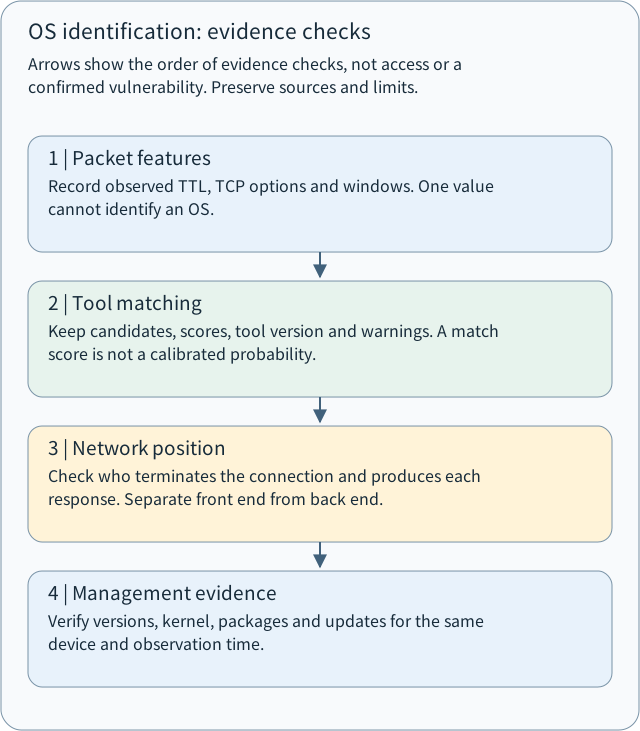
Arrows show the order of evidence checks, not access or a confirmed vulnerability. Preserve sources and limits.
- 1 | Packet features
Record observed TTL, TCP options and windows. One value cannot identify an OS.
- 2 | Tool matching
Keep candidates, scores, tool version and warnings. A match score is not a calibrated probability.
- 3 | Network position
Check who terminates the connection and produces each response. Separate front end from back end.
- 4 | Management evidence
Verify versions, kernel, packages and updates for the same device and observation time.

8 | Defense and acceptance: use identification in operations
Fingerprinting can support defensive work beyond naming an OS. The four directions below connect a tentative observation to an operational check.
8.1 Maintain the asset inventory
Suppose an organization records one hundred devices:
80 Windows workstations
15 Linux servers
5 network devices
An authorized survey finds an IP with router-like or other unexpected characteristics. Do not immediately label it malicious. Check whether it is inventoried, whether the organization manages it, what it does, and who maintains it. The discrepancy may reveal an unmanaged asset or an outdated record.
How should this be accepted?
Having an inventory document is only a starting point. Confirm that observed IPs and device identifiers can be connected to actual assets, owners and OS versions, with evidence sources and confirmation dates. Fingerprinting supports discovery; it is not final proof of asset identity.
8.2 Reduce unnecessary exposed entry points
Suppose a company web server presents:
22/tcp    open
80/tcp    open
443/tcp   open
3306/tcp  open
Ports 22, 80 and 443 commonly serve SSH, HTTP and HTTPS; 3306 is commonly associated with MySQL. Does Open mean every one of those services has a vulnerability? No. It identifies an entry point, not a confirmed weakness.
Check whether each service is needed and whether the observed source should be able to access it. If MySQL only needs application-server clients, consider restricting other sources. This reduces attack surface according to the actual business need.
How should this be accepted?
Verify access from different sources: authorized application servers should connect, while unauthorized sources should not. Filtered from one location does not prove equivalent restrictions everywhere. As M03-04 explains, a port state is an observation under particular probing conditions.
8.3 Update and patch
If a fingerprint resembles a Linux kernel family, can you search for a CVE and declare that kernel vulnerability present? No. The fingerprint may not identify the exact kernel. Even an apparently old version can contain vendor-backported security fixes.
A version string alone establishes neither vulnerability nor remediation. Nmap also discusses why reported versions and actual patch state can differ. Nmap OS detection
A defensible sequence
OS fingerprint
       |
Candidate system
       |
Verify actual OS
       |
Verify kernel / package versions
       |
Compare vendor advisories
       |
Identify applicable updates
       |
Deploy and verify updates
       |
Record final patch state
M05 Vulnerability Analysis develops this kind of applicability and verification work further.
8.4 Observe unusual probing
Active fingerprinting may send several kinds of probes. Firewalls, IDS and network monitoring may therefore observe relevant patterns: for example, multiple TCP probes from one source to a host in a short period, including features uncommon in ordinary business traffic.
Such activity merits investigation, but a few unusual packets do not prove an attack. Legitimate diagnostics or authorized vulnerability scanning can produce similar traffic, and intermediate devices affect logs. Correlate source, time, destination, packet characteristics and authorization.
How should this be accepted?
For a detection rule, use known test traffic in an isolated, authorized environment. Check whether the monitor records the relevant activity, identifies activity worth investigating, avoids excessive false positives, and associates records with the correct device and time.
No alert does not establish the absence of probes. The sensor position or detection capability may be insufficient.
9 | Safe practice and short checks
Use a paper-based synthetic case. No scanning of real devices is required.
9.1 Integrated scenario
Consider this hospital architecture:
Internet
    |
Firewall
    |
Server A: Reverse proxy
192.168.1.10
    |
Server B: Hospital web application
192.168.1.20
The supplied synthetic test record is:
TCP Port:
443/tcp   open
65000/tcp closed

Packet Characteristics:
TTL: 61

TCP Options:
MSS
SACK Permitted
Timestamp
Window Scale

OS Detection:
Candidate: Linux-like System
Match Score: 95%

Service Detection:
Application: Hospital Web App
The architecture document says A terminates external TCP and B runs the hospital application.
9.2 Interpretation exercise
Question one: TTL. Why does TTL 61 not prove Linux? What further information would you need?
Question two: active and passive collection. Method A uses Nmap -O in an authorized environment. Method B analyzes lawfully obtained existing packets. How do their evidence sources differ, and what limits each method?
Question three: reverse proxy. The tool reports:
OS: Linux-like System
Application: Hospital Web App
Given that A terminates external TCP, which device's OS should be checked first? Why does the result not establish that B runs Linux?
Question four: evidence and verification. With a 95% fingerprint match, may a report say “Confirmed Linux, with 95% confidence”? If not, rewrite that statement so it distinguishes the observation, tool inference and outstanding verification.
10 | Sources and version scope
The lesson develops the original M03-06 material and checks its mechanisms against Nmap documentation and protocol specifications. Four core references are:
| Document | Use in learning |
|---|---|
| Nmap: Remote OS Detection | Fingerprinting purpose and principles |
| Nmap: TCP/IP Fingerprinting Methods | TCP, UDP and ICMP feature collection |
| RFC 791: Internet Protocol | IPv4 and TTL mechanisms |
| RFC 9293: Transmission Control Protocol | TCP headers, windows and protocol behavior |
Nmap implementation and fingerprint databases change over time. Preserve the tool version when interpreting an actual scan; this lesson does not claim to have run one.
11 | Extended teaching Q&A: three common confusions
These three questions extend the teaching. Actual reader questions remain in the separate page Q&A section.
Q1: Does knowing an IP address reveal the operating system?
No. An IP address locates a network endpoint and generally does not name its OS. Packet responses, service information or authorized administrator records provide additional evidence. Even available responses do not guarantee successful identification.
Q2: Can OS fingerprinting still work with HTTPS?
Yes. For HTTPS over TCP, such as HTTP/1.1 or HTTP/2, TLS encrypts application data without hiding every IP and TCP header. Window and option information can remain observable outside the encrypted application data. HTTP/3 uses QUIC over UDP, so the TCP Window and Options analysis here does not directly apply to it.
HTTPS therefore does not automatically prevent TCP/IP fingerprinting. A reverse proxy, VPN or other intermediary may nevertheless change the observed endpoint and packet characteristics.
Q3: If Nmap suggests Linux, should you immediately declare a Linux vulnerability?
The candidate can guide a vulnerability investigation, but it does not prove a vulnerability. Confirm the actual system and version, affected components, patch state and applicability conditions. M03 emphasizes discovery and identification; M05 evaluates whether a weakness exists and what risk it poses.
Chapter review: the OS fingerprinting knowledge map
| Concept | Understanding to retain |
|---|---|
| OS fingerprinting | Infer an OS from network response characteristics |
| Protocol stack | A device's implementation of network protocols |
| Active fingerprinting | Send probes deliberately and analyze replies |
| Passive fingerprinting | Analyze lawfully obtained existing traffic |
| TTL | A clue that cannot independently confirm an OS |
| TCP Window | Flow-control information that can contribute features |
| TCP Options | Option types and order may reflect implementation differences |
| Open + Closed | Generally help Nmap collect a more complete fingerprint |
| Match score | A measure of correspondence, not necessarily calibrated correctness probability |
| Reverse proxy | May expose the frontend rather than the backend stack |
| Administrator verification | Check hypotheses using OS versions and patch records |
| Defensive value | Support asset inventory, exposure management and vulnerability investigation |
The ability to take away
This chapter teaches how to build a verifiable technical inference from limited network observations:
Observation → Features → Hypothesis → Verification → Conclusion
The common error is promoting the hypothesis directly into a conclusion. The same discipline applies to service identification, vulnerability analysis, incident investigation and digital forensics.
Next, answer the four scenarios in section 9, especially the reverse-proxy question. Explain who produced the packet, which device the tool may be identifying, and what evidence is still missing. Your answers provide the evidence for checking your understanding.
Reference answer: Does TTL 61 confirm the system?
TTL 61 is the remaining value at the observation point; the initial value and decrements along the path affect it. An initial value of 64 with one decrement per hop supports three decrements only under those synthetic assumptions. Different systems and settings can produce the same TTL, so additional response features, network context and administrator evidence are needed. Record observations separately from assumptions.
Reference answer: How do active and passive collection differ?
Analyzing authorized existing packets uses traffic that already occurred; the recording and observation location limit what can be learned. Nmap -O sends additional probes and observes responses, making it active identification. Both approaches require appropriate permission. Passive observation does not authorize collecting other people's traffic.
Reference answer: How should front-end and back-end clues be checked?
First determine where the external TCP connection terminates. If it terminates at the front end, investigate that device using the stack fingerprint. Check the service self-description against its actual source and the running back-end program. Preserve each observation's location, time, tool and raw response, then confirm using architecture settings, device versions and update records. Different clues can describe different layers rather than demonstrate that one result is necessarily wrong.
Reference answer: How should a candidate or no exact match be recorded?
Label the result as a tool inference or candidate, preserving the original name, score, missing responses and warnings. A 95% feature-match score is not automatically a real-world accuracy rate; no exact match does not mean that no operating system exists. An authorized administrator should verify the target device, complete system and kernel versions, package patch records and intermediary devices. Until then, do not record the candidate as a verified version or established vulnerability.
Concept Q&A
Pending: related questions will be edited into anonymous teaching notes when available.