CEH M03-05 | Service Versions and Banners: What Does an Open Entry Point Actually Provide?
In one sentence: a port locates an entry point, while service responses provide identification clues; compare responses, test conditions and device-side records to establish the service and its patch status more reliably.
The previous unit explained Open, Closed and Filtered: what port state this particular test observed. This unit asks the next question: once an entry point is open, what service and version are behind it?
1 | Start with a shop sign
Imagine a shop on a street:
- Its street number is 443. That is an address clue.
- Someone answers the doorbell. You can reach this entrance on this occasion.
- They say, “This is Morning Light Bookshop.” You have a self-description.
- Following the agreed rules, you ask what it offers and identify its services from the replies.
- Finally, the manager provides registration and operating records, which you compare with what you observed.
Network services are similar. A port is a numbered entry point through which a network program receives communications. A service provides a function, such as websites, email or remote administration. A version identifies a software release. These are related, but one entry-point number cannot establish the service, product and complete version by itself.
For example, TCP 443 commonly carries HTTPS. TCP (Transmission Control Protocol) provides reliable, connection-oriented transport. HTTPS is HTTP web communication protected by TLS (Transport Layer Security). A custom service can also use TCP 443, and a web service can use another port.
2 | What is a banner, and why collect it?
A banner is text or information a service returns that can help identify it. Banner grabbing collects these responses as clues for asset inventory and further verification.
It is not limited to a welcome message on a login screen. Examples include:
| Response location | Possible content | What to record initially |
|---|---|---|
| SSH identification line | `SSH-2.0-ExampleSSH_1.2` | The declared SSH protocol and software identification |
| Mail service greeting | `220 mail.example.test ...` | Response code, hostname and service self-description |
| HTTP response header | `Server: ExampleWeb/1.2` | Product/version string in this particular response |
These strings are synthetic examples, not actual scan results. SSH means Secure Shell and supports secure remote connections. HTTP means Hypertext Transfer Protocol, the protocol used to exchange web requests and responses. Headers are fields describing a request or response.
A banner helps you begin an evidence-based inventory: what an endpoint might offer, whether an unexpected service is present, and which administrator should verify it. A banner may omit a version, be customized by an administrator, or come from a proxy in front of the application. Preserve the original response first, then identify how far it supports your conclusion.
3 | Waiting for a greeting versus sending a probe
Some services send a greeting after a connection is established. Others answer only after receiving a correctly formed protocol request.
A probe is data sent to observe a service's behavior. Service detection analyzes responses. Version detection also attempts to identify a product, release and related information. Banner grabbing is one technique within this broader process, not the whole process.
Nmap is a network exploration and security auditing tool. Its service-detection process may establish a TCP connection and wait for an initial response before sending probes appropriate to the service. In this context, its NULL probe means waiting after connection establishment without first sending application-layer probe data. It still establishes a network connection, so it is not passive collection that never contacts the target.
By contrast, analyzing previously and lawfully collected packet records without making a new connection is a different observation method. Both approaches remain subject to authorization, data-use and retention limits.
4 | Where does the evidence behind Nmap's SERVICE column come from?
Distinguish two sources:
1. A familiar name from a port table: the tool may show a common service name based on the transport protocol and port number. This is a classification clue, not verified program identity.
2. Identification from actual responses: with Nmap's `-sV`, the tool attempts to identify the service and version using responses and a signature database. This adds evidence beyond the entry-point number, but the result and test conditions still need review.
The following only explains parameters; it is not an instruction to scan an external host:
nmap -sV -p 8080 <explicitly-authorized-isolated-lab-host>`-sV` requests service/version detection; `-p 8080` limits the port selection to 8080. The angle-bracket text is an explanatory placeholder, not an address to execute unchanged. Before a real exercise, confirm that the target, service, time window, probing method and stop conditions are authorized.
Version probes interact with the service and are not guaranteed to have no effect; some devices may treat probe content as real work. Beginner exercises should not override the tool's default exclusions or substitute the broader `-A` option for this unit's `-sV`.
The tool may obtain a full match or only partial clues. Nmap's softmatch narrows the subsequent probes using a preliminary service-type match. It does not establish an exact version or provide a score you may independently translate into “90% certain.” If identification is incomplete, keeping “not confirmed” is more useful than inventing a version.
Version detection and OS fingerprinting are separate tasks. OS means operating system. Service/version detection primarily uses application responses; OS fingerprinting, such as Nmap's `-O`, infers the operating system from network-stack response characteristics. Platform clues in service replies are useful to preserve, but do not replace operating-system verification. The next unit develops OS fingerprinting further.
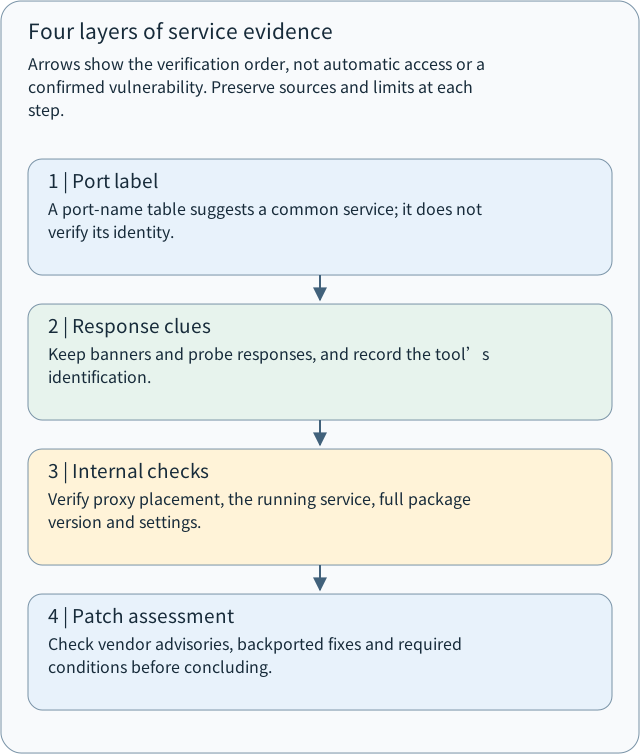
Arrows show the verification order, not automatic access or a confirmed vulnerability. Preserve sources and limits at each step.
- 1 | Port label
A port-name table suggests a common service; it does not verify its identity.
- 2 | Response clues
Keep banners and probe responses, and record the tool’s identification.
- 3 | Internal checks
Verify proxy placement, the running service, full package version and settings.
- 4 | Patch assessment
Check vendor advisories, backported fixes and required conditions before concluding.
5 | Why does a visible version not immediately confirm a vulnerability?
A vulnerability is a security weakness that may be exploitable. Determining whether a particular weakness applies requires more than a version clue: verify the product, package source, patch history, configuration and necessary conditions.
Two common reasons follow.
A. You may be observing a front-end proxy
A reverse proxy accepts client requests on behalf of services behind it. A backend/origin server is a service behind that front end that performs some of the actual processing.
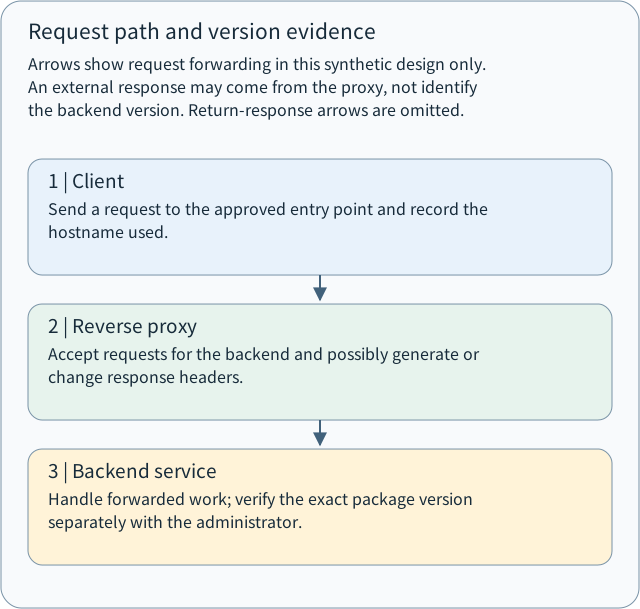
Client → Reverse proxy → Backend application
          ↑ This layer may generate or modify response headers
An externally visible `Server` string may therefore describe the front end or contain forwarded or modified information. It cannot establish an exact backend package version by itself. HTTP also permits omitting `Server` and recommends avoiding unnecessary detail.
Arrows show request forwarding in this synthetic design only. An external response may come from the proxy, not identify the backend version. Return-response arrows are omitted.
- 1 | Client
Send a request to the approved entry point and record the hostname used.
- 2 | Reverse proxy
Accept requests for the backend and possibly generate or change response headers.
- 3 | Backend service
Handle forwarded work; verify the exact package version separately with the administrator.
B. An older version number may include backported fixes
Backporting brings a specific fix from a newer release into an older maintained release without necessarily adopting the same upstream major version number. Upstream refers here to the original software project; operating-system vendors may maintain their own package revisions and patch records.
An apparently old string may therefore correspond to a patched vendor package. Conversely, the absence of a visible version does not establish security. Compare the complete device-side package version with vendor advisories instead of deciding solely by sorting version strings.
6 | A complete synthetic case: turn an inference into a traceable record
Suppose you are authorized to inventory TCP 8080 in an isolated teaching environment. All the following are teaching data:
Observation 1: 8080/tcp open
Observation 2: HTTP response includes Server: ExampleWeb/1.2
Observation 3: Architecture records show a reverse proxy in front
Management record: Backend package is example-app 4.0-vendor3
Patch status: Vendor advisories and installation records still need checking
Compare two records:
- A premature conclusion: “The backend runs ExampleWeb 1.2 and is vulnerable.” This conflates the front-end response, backend product and vulnerability determination.
- A verifiable record: “At the specified source location and time, TCP 8080 accepted a connection; the HTTP response identified itself as ExampleWeb/1.2. Architecture records show a reverse proxy, so this string does not yet confirm the backend version. Management records list example-app 4.0-vendor3. Next, correlate the running service with its package, vendor patch advisories and configuration.”
This also applies the M03 chapter supplement: a port state is an observation, not evidence of compromise. An `open` state, a readable banner and a successful product identification do not establish login access or prove exploitability.
7 | How can administrators defend services and preserve validation evidence?
Manage service-identification information alongside actual maintenance:
| Work | Purpose | Evidence to retain |
|---|---|---|
| Inventory necessary services and owners | Identify unnecessary or unexplained entry points | Confirmed assets, purposes and owners |
| Remove unnecessarily detailed banners | Reduce exposure of internal details | Before/after responses and configuration records |
| Restrict access by source | Expose administration entry points only to approved sources | Access rules and validation under comparable conditions |
| Verify and patch packages | Address actual security defects | Complete package versions, vendor advisories, installation and restart records |
| Observe unexpected probes | Detect unanticipated connections and identification activity | Service, proxy and firewall logs correlated by time and source |
Hiding a banner manages information disclosure; it does not replace patching. After updating a package, also confirm that the running process uses the new version. A new package on disk alone does not establish that the service has reloaded it.
A useful identification record includes authorization scope; target, transport protocol and port; source location; hostname used; time and time zone; tool version and parameters; original response; observed product string; supported inference; internal records; and outstanding questions. Remove passwords, session information and unnecessary personal data before sharing.
8 | A safe exercise and understanding checks
No network packets are required today. Using the synthetic records in section 6, write three lines:
1. Observation: which responses or documents did I actually obtain?
2. Inference: what do those clues currently support?
3. Outstanding verification: which management-side records are still needed to verify versions and patches?
Then try four questions:
1. A scan displays `443/tcp open https`. If you do not know how the service name was obtained, why should you not fill in a web-server product and version immediately?
2. Nmap establishes a TCP connection and only waits for a greeting. Why is that still not passive collection that never contacts the target?
3. An external response says `ExampleWeb/1.2`, but there is a reverse proxy and the vendor may backport fixes. What three or more categories of evidence should you obtain to determine whether a particular weakness affects the backend?
4. After hiding the version banner, may an administrator mark “vulnerability fixed” as complete? How should these two outcomes be validated separately?
Takeaway: entry-point number → response clue → internal verification → patch assessment. Preserve evidence and limits at each step to use service identification for real inventory and defense.
Sources and verification scope
This unit follows the designated source outline's M03-05 “Service Version & Banner Grabbing” and the M03 observation principle. Technical supplements were checked on 2026-11-03. Official web documentation is continuously updated; its contents are not presented as proof of a particular installed tool version.
- Nmap: Service and Version Detection
- Nmap: Version Detection Technique
- Nmap: Probe Database and softmatch
- RFC 9110: HTTP Server field (2022, §10.2.4)
- Red Hat: Backporting Security Fixes
Reference answers are published with the website lesson. The chat delivery leaves the questions first and provides the answer URL only after production verification. Publishing answers does not mean the reader has submitted an answer or mastered the unit.
Reference answer: 1. Entry-point number and service identity
`open` describes the port state observed in this test. `https` may be a familiar name from a port table or a result of additional service detection; first establish how it was produced. Even a response consistent with HTTPS requires further checks for the product, complete version and deployment position. Preserve the original output and probing method, and leave unverified product/version fields pending.
Reference answer: 2. An established connection already contacts the target
Establishing TCP exchanges network packets with the target and may create service logs. “NULL” means that no application-layer probe content has yet been sent, not that no interaction occurred. Authorization and service-impact considerations still apply. Analyzing previously and lawfully collected traffic without making a new connection is a different, passive observation method.
Reference answer: 3. Complete the backend and patch evidence
Obtain at least three categories: first, proxy/backend architecture and the origin of the response string, to establish which layer it describes; second, the backend's running program, complete package version and vendor revision; third, vendor advisories, backport and installation records, and the configuration conditions required for the weakness to apply. Where relevant, confirm that the service has reloaded the patched version. Record external responses separately from internal evidence before assessing applicability.
Reference answer: 4. Validate disclosure reduction and patching separately
Hiding the version can be recorded as “version disclosure reduced” after checking the actual post-change response. “Vulnerability fixed” needs separate evidence: package/advisory comparison, patch installation results, running-version and configuration checks, and the corresponding authorized validation. Both tasks can be scheduled together, but neither substitutes for the other.
Concept Q&A
Pending: related questions will be edited into anonymous teaching notes when available.