Why keep checking after disconnecting a NAS?
Disconnecting a NAS after a security alert creates time to investigate. The next questions are who can still reach it, what they can change, and whether damaged data can be restored. Those answers determine which services can return.
This article uses a laboratory file-sharing scenario to explain isolation, patching, remote access and recovery. Devices, accounts and paths are teaching examples. The six diagrams explain decisions; an administrator must separately verify a real device’s versions, compromise status and recovery results.
How a NAS shares files
Network Attached Storage (NAS) is a server that provides files over a network. Researchers use their own computers to share papers, models and research data. Accounts and folder permissions determine who can read, write or delete files.
An IP address helps a computer locate a device. SMB (Server Message Block) is a common file-sharing protocol. DSM (DiskStation Manager) is the operating system on a Synology NAS; packages add services. Reaching an address, signing in and obtaining write access are separate conditions.
For example, smb://192.168.1.20/Research opens a Research share over SMB in a managed test network. This address and name are synthetic. Confirm the authorized address and account with the administrator before connecting.
A LAN is a local area network. Each user connects independently to the NAS.
Laboratory LAN: independent access paths
-
Researcher A’s computer
Computer A → NAS: uses its own account to read and write permitted folders over SMB.
-
Researcher B’s computer
Computer B → NAS: reaches the same storage directly; permissions may differ from A’s.
-
Shared NAS storage
Checks each account’s permissions separately and stores papers, models and research data.
The cards represent parallel relationships. A does not connect through B.
Download SVG: Figure 1 | Two computers, one shared resource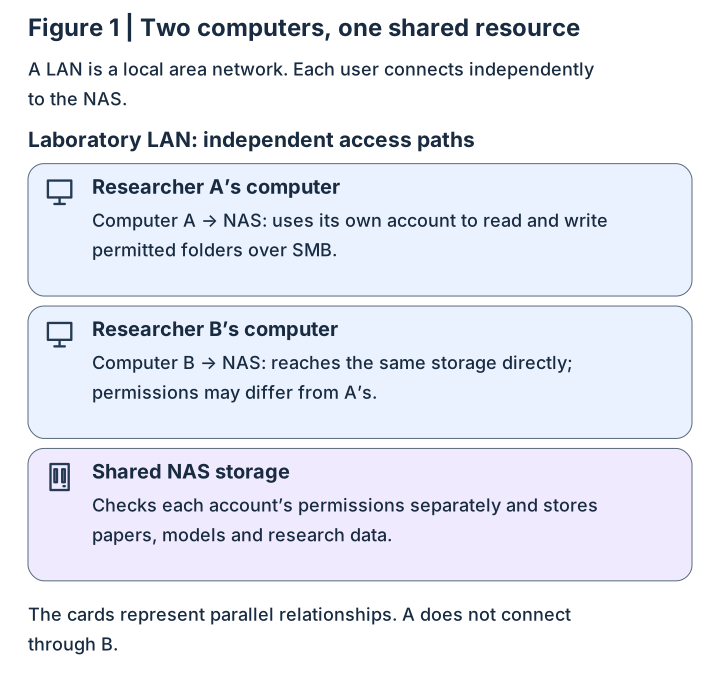
Name the exact isolation boundary
After the Internet uplink is disconnected, the switch and local network may still operate, and local computers may still reach the NAS. Disconnecting all NAS network links removes access through those interfaces. Record all interfaces, routes and remote entry points to establish the actual boundary.
Isolation controls which paths can reach the device. An infected local computer with write access also requires endpoint and permission controls. Use a controlled computer and an approved path for maintenance instead of reopening every entry point for an update.
Distinguish an Internet uplink outage from disconnected NAS interfaces.
A | Internet disconnected, LAN retained
-
Internet path: disconnected ×
Internet × router: this path is unavailable.
-
LAN path: still requires controls
Local computer ↔ NAS: file sharing remains possible when networking and permissions allow it.
B | All NAS network links disconnected
-
Computer to NAS: path disconnected ×
Access through disconnected interfaces stops. Arrange a separate controlled maintenance path.
Record which interfaces are disconnected or blocked and which services remain reachable.
Download SVG: Figure 2 | Two disconnections, different remaining paths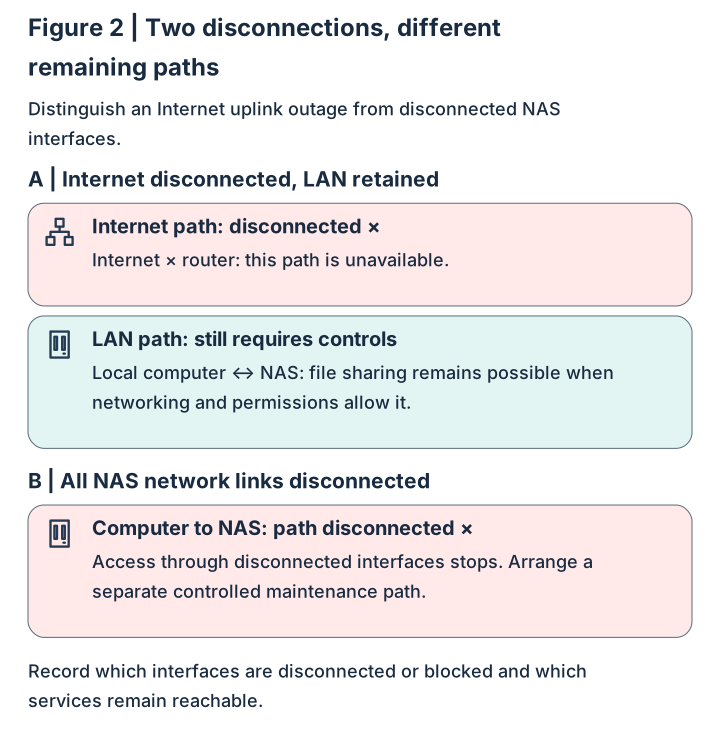
Vulnerabilities and write permissions create different paths
A vulnerability is a flaw in software design or implementation. Exploitation depends on reachability, affected versions and conditions such as authentication. Ransomware can also modify shared files using the existing permissions of an infected computer. This path matters even when no NAS vulnerability is exploited.
Plan patching and write restrictions together. Separate administrative and everyday accounts, grant folder permissions by task, and use read-only access where sufficient. Test both that intended operations succeed and that unauthorized operations are denied.
Arrows show possible propagation of impact, not evidence that a particular device was compromised.
A | Exploiting a reachable service
-
External attacker
Can reach an exposed service.
-
Affected NAS service
The version and exploitation conditions apply.
-
Unauthorized impact
May read or write files or disrupt a service, depending on the vulnerability.
B | Using existing file permissions
-
Infected computer
Malware operates in the user’s environment.
-
SMB write permission
The account is permitted to modify shared folders.
-
Shared data modified
Writable files may be deleted or encrypted.
Patches address software flaws; least privilege, endpoint protection and recovery copies address distinct risks.
Download SVG: Figure 3 | Two paths requiring separate controls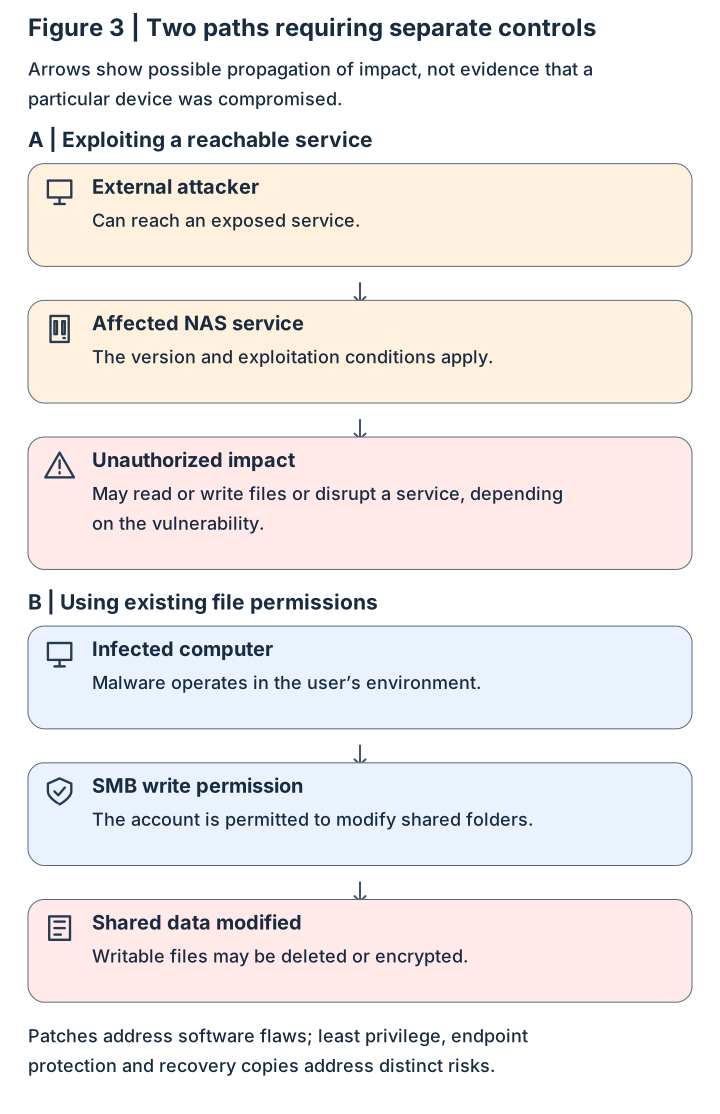
Inventory DSM and packages separately
Checked on November 1, 2026, Synology SA-26:13 lists 7.4-90075 for DSM 7.4 and separate fixes for other branches. Its vulnerabilities have differing privilege requirements. Compare the actual branch and full version rather than applying one number to every system.
SA-26:14 addresses PHP, Mail Station and Synology Calendar packages. PHP 7.3 is end of life with no fix; the other affected packages have their own fixed releases. Check Package Center separately after updating DSM.
These advisories illustrate inventory checks. Obtain the original alert and exact CVE vulnerability identifier to establish relevance to the device. Record versions before and after maintenance, execution time and functional tests. Handle signs of compromise through incident investigation.
| Inventory location | Evidence to record |
|---|---|
| Control Panel: Update & Restore | Model, full DSM version and Update number |
| Package Center | Installed packages, full versions and support status |
| Network and routing devices | Interfaces, exposed entries, forwarding, IPv6 and remote paths |
| Accounts and logs | Administrative privileges, unusual logins, unknown accounts and mass file changes |
| Backup and snapshots | Success time, independent copies and restore-test results |
Design web and SMB access separately
A Cloudflare Tunnel connector establishes outbound connections so traffic can pass through Cloudflare. For a web service, configure Access identity and allow policies as well: a transport path and permission to enter are different controls. NAS authentication and file permissions still apply.
SMB does not automatically inherit a protected web application’s path. Cloudflare documents SMB access using the Cloudflare One Client with private routes and Split Tunnels configuration for the relevant private network. Verify network policy, name resolution and NAS permissions during implementation.
This is a candidate architecture. Test authorized and unauthorized accounts, check for paths that bypass identity controls, and have the administrator approve the access scope before adopting it.
Web arrows show logical access order; the connector initiates the outbound tunnel.
Web service: access after identity checks
-
Remote browser
The user requests a NAS web service.
-
Cloudflare Access
Allows or denies access through identity and application policies.
-
Tunnel and NAS
The tunnel carries traffic; the NAS checks sign-in and operation permissions.
SMB: a separate private-network path
-
Managed client → NAS
Cloudflare One Client, private routes and network policies carry SMB; the NAS manages file permissions.
After entry authentication succeeds, authorized computers and accounts still need appropriate write restrictions.
Download SVG: Figure 4 | Transport, identity and permissions have distinct roles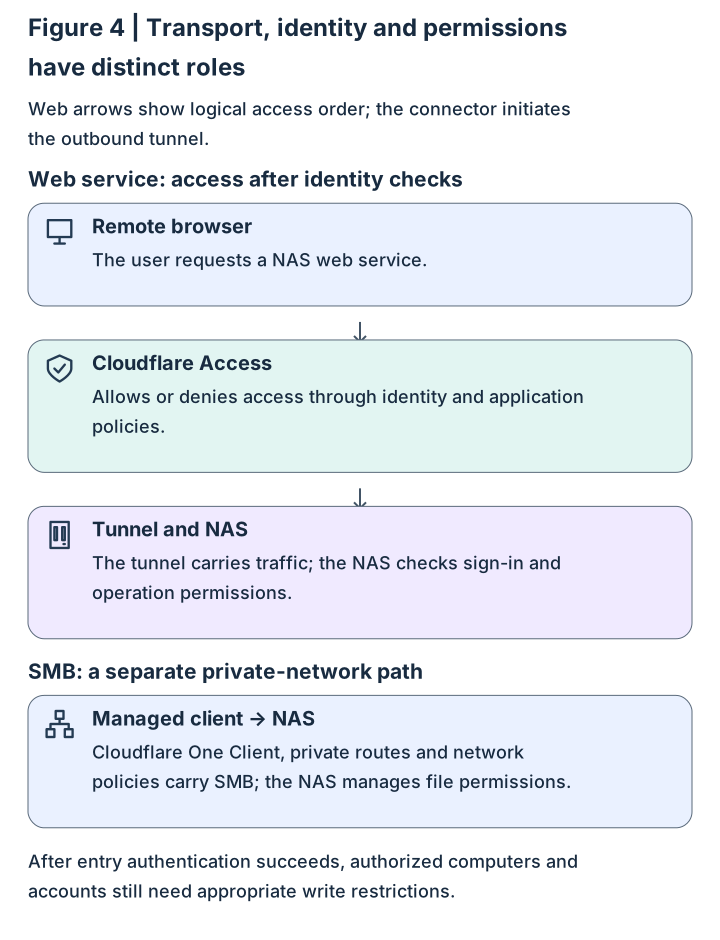
Make data recoverable: distinguish three protections
RAID (Redundant Array of Independent Disks) and SHR (Synology Hybrid RAID) can tolerate some disk failures, depending on configuration. An array also preserves file deletions and modifications. Snapshots capture a point in time for recovery; snapshots retained only on the same device share hardware and some administrative risks.
Independent backups place copies at another destination, with off-site, offline or immutable protection as appropriate. Immutability restricts modification or deletion for a defined period; verify model, file-system and configuration support. Separate backup accounts and administrative rights so a compromised account cannot readily rewrite every copy.
For an authorized test file, record its content or hash, back it up, restore it to a separate test directory, and compare content and permissions. Record elapsed time and clean up test copies. Use a controlled environment for destructive tests of production data. Keep separate evidence of backup success and successful restoration.
The three cards address different problems and represent parallel protections.
Three protection roles for NAS data
-
RAID / SHR
Tolerates disk failures according to configuration; deletion or encryption is reflected in the array.
-
Snapshots
Retains points in time for quick recovery; local copies share device risks.
-
Independent backup
Stores copies at another destination with separately managed access.
Preserving and verifying backup copies
-
Off-site / offline / immutable
Choose location and protection periods for the risks, and verify product support.
-
Restore test
Restore to a test directory and check files, permissions and elapsed time.
Restore evidence answers whether data can be recovered; job status answers whether a backup ran successfully.
Download SVG: Figure 5 | Disk resilience, points in time and independent copies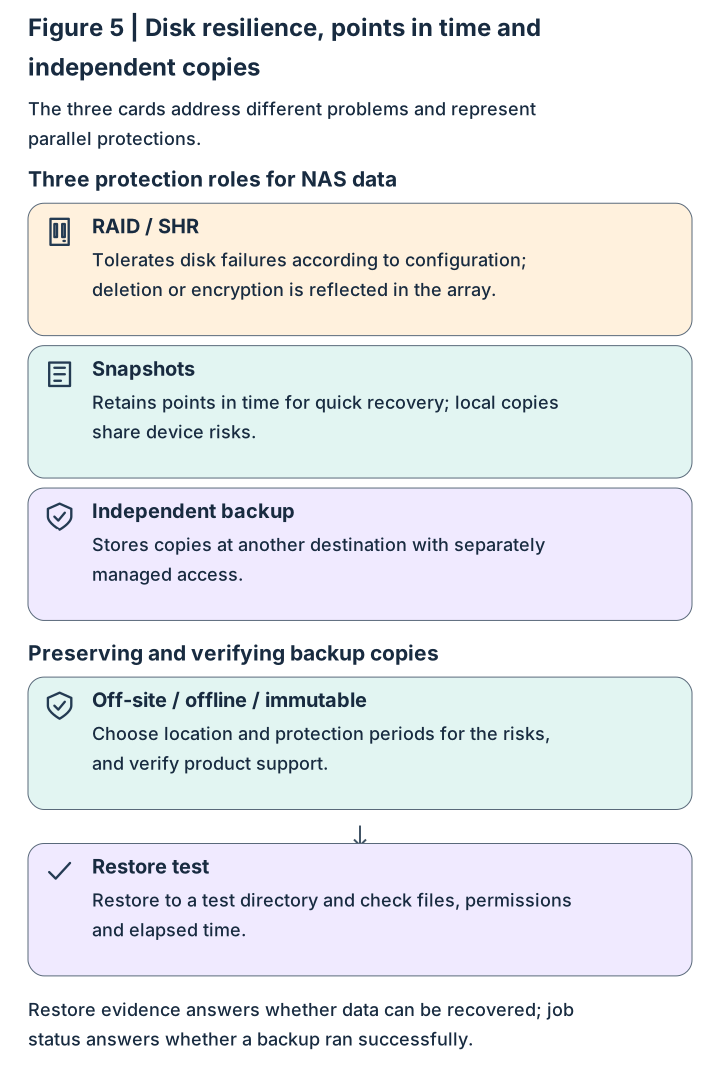
Restore service in stages using acceptance evidence
Returning to service is a sequence of decisions. Establish isolation and preserve records, inventory and patch, then validate accounts, services and recovery. Record the owner, time and result of each step before deciding which users and services can return first.
If ransom notes, unknown administrators or unusual mass file changes appear, maintain isolation and preserve records for incident responders to assess investigation and rebuilding. Routine patching applies after status assessment; cleanup and reconnection of a suspected compromised device require incident-response evidence.
This is a response plan, not a record of completed maintenance.
From isolation to limited restoration
-
01 | Confirm isolation
List interfaces, paths and services still reachable.
-
02 | Preserve and inspect records
Check logins, accounts and file anomalies; escalate suspicious findings.
-
03 | Inventory and controlled patching
Check DSM and packages individually and record versions before and after.
-
04 | Verify permissions and recovery
Test allowed and denied operations and restore an independent copy.
-
05 | Reconnect in stages
After administrator acceptance, restore necessary services and monitor logs.
At any step, signs of compromise require continued isolation and incident handling; reconnect according to the assessment.
Download SVG: Figure 6 | Five evidence-based steps to reconnection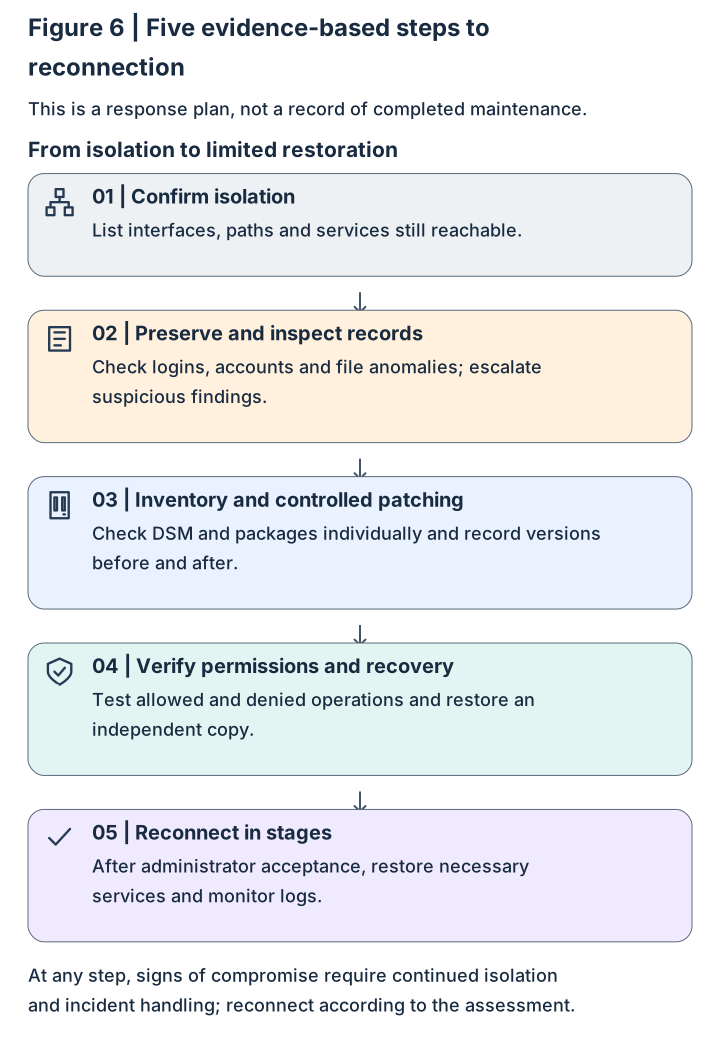
Understanding check: who can still change data?
Scenario: the NAS is patched and has no directly exposed inbound entry, but a user’s computer is infected. Why might shared files still be encrypted? Choose one control and identify the part of the path it protects.
Suggested reasoning: malware may use the user’s existing write permissions. Read-only access where editing is unnecessary reduces impact; endpoint protection addresses infection; independently protected and tested copies support recovery. Identify the path covered by your chosen control and the parts needing additional measures.
Next step: use the inventory table for a device you are authorized to manage. Record its current state, then choose one check that most reduces uncertainty, such as obtaining a full package version or restoring a test file.