CEH M09-06 | Independent Verification & Anti-Phishing Controls
Module 09: Social Engineering. Suggested reading: 10–15 minutes.
1. The main idea: a suspicious request must not supply its only proof of authenticity
Someone sends: “I am your manager. Upload the records to this new website. If you are unsure, call the number below.” You call, and the person confirms. Have you verified the request?
Not necessarily. The request, telephone number, and answer may all be controlled by the same person.
The goal is not to distrust everyone. Before a sensitive action, use an already trusted source to confirm who is asking, exactly what is requested, and whether it is authorized. Complement that process with multiple controls so a single mistake does not immediately cause major harm.
M09-05 distinguished legitimate accounts from legitimate actions. This unit turns that distinction into a usable workflow and brings the social-engineering chapter together.
2. Figure 1: separate the request from its evidence
Separate an untrusted request from a known source. Verify identity, specific request and authority before acting.
The whole diagram scales proportionally to this column. Small screens also shrink its text; open the original SVG to zoom, or read the explanation below.
- How to read the diagram
- Separate an untrusted request from a known source. Verify identity, specific request and authority before acting.
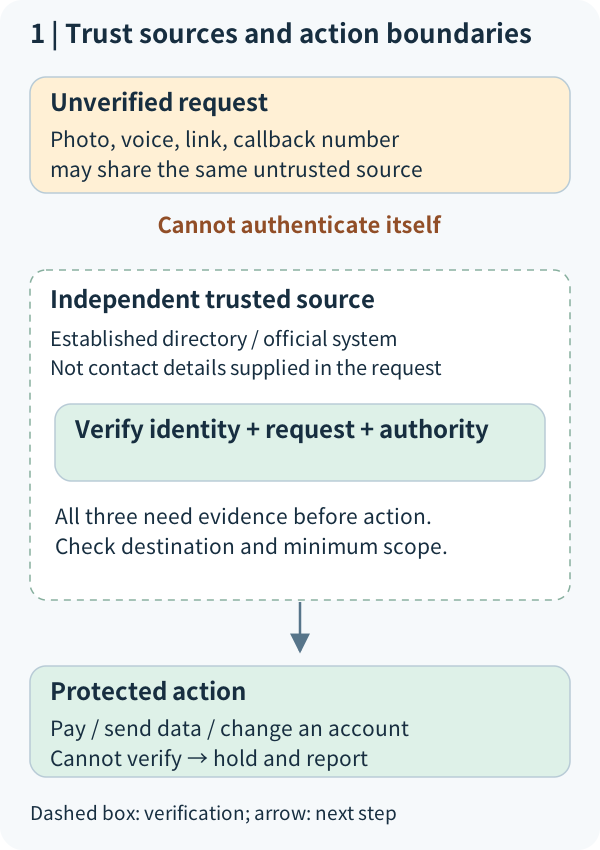
Independent verification uses evidence that does not depend entirely on the message or channel being questioned.
For a message claiming a bank-account problem, open the previously verified official app or use established contact details rather than following the message. The FTC recommends a phone number or website known to be genuine, not the details provided by a suspicious message. FTC guidance
A trust boundary separates information that has not yet been accepted as trustworthy from the authority to take action. Figure 1 puts the claim on one side and the protected action on the other; verification and authorization sit between them.
Changing apps or asking twice does not by itself create independent evidence.
| Action | Independent evidence? | Why? |
|---|---|---|
| Reply to the original email: “Is this really you?” | Usually not | Whoever controls a compromised account may also answer |
| Call the new number in that email | Usually not | The contact details are themselves unverified |
| Call a number in an established directory | Helps | Its source is independent of this message; still verify the specific request |
| Check an approval in the established business system | Helps | Check its scope and validity, not just its existence |
Independence is not an absolute guarantee. An established directory may have been altered, or another channel may also be compromised. High-risk work still needs suitable approvals, permissions, and records. A callback is not a universal solution.
The dashed boundary in Figure 1 encloses verification; the arrow leads to action only after verification. It is not a required network-packet path.
3. Figure 2: verify a specific action, not just an account
Call a number from an established source. Verify the specific request and approval. Stop when denied or unclear.
The whole diagram scales proportionally to this column. Small screens also shrink its text; open the original SVG to zoom, or read the explanation below.
- How to read the diagram
- Call a number from an established source. Verify the specific request and approval. Stop when denied or unclear.
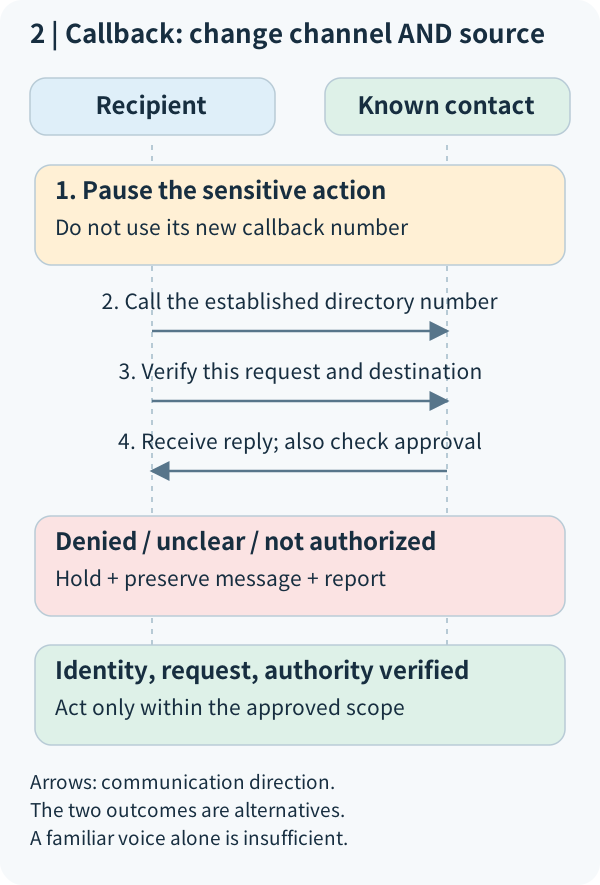
Consider a fictional organization, Northstar Learning Centre. An administrator receives an apparent vendor email: “Upload the learner list to a replacement folder today.” It includes a new phone number and upload link.
First, pause sensitive or difficult-to-reverse actions. Do not upload the list, enter passwords or codes, or install remote-control software. Pausing does not accuse the sender of fraud; the evidence is currently insufficient.
Second, find an established trusted channel. Use contact information from existing vendor records, not the new number. If there is no trustworthy channel, ask the established owner or support process to verify. An apparently official search advertisement is not automatically a reliable substitute.
Third, confirm the details. “Did you send an email?” is too broad. Ask:
- Which records are needed, and for what purpose?
- Which approved destination will receive them, and who can access it?
- Who approved the change? Is it within the relationship and role?
- Is the requested operation viewing, downloading, uploading, or changing permissions?
Fourth, check authorization. Authentication and authorization are different gates. Even a genuine vendor may not be entitled to the complete learner list. Establishing identity resolves only part of the problem.
Fifth, branch on the result. Execute only the necessary scope when the request and authority are established. A denial, discrepancy, or unresolved question means hold and report rather than guess and proceed. Urgent work should use an established emergency-approval process, not an exemption from every check.
Time runs downward in Figure 2; arrows show interactions. The verification arrow intentionally goes to established contact details, not back to the number supplied by the suspicious message.
4. Figure 3: anti-phishing is a set of complementary controls
Five complementary control areas protect different gates. No single check proves message or action safety.
The whole diagram scales proportionally to this column. Small screens also shrink its text; open the original SVG to zoom, or read the explanation below.
- How to read the diagram
- Five complementary control areas protect different gates. No single check proves message or action safety.
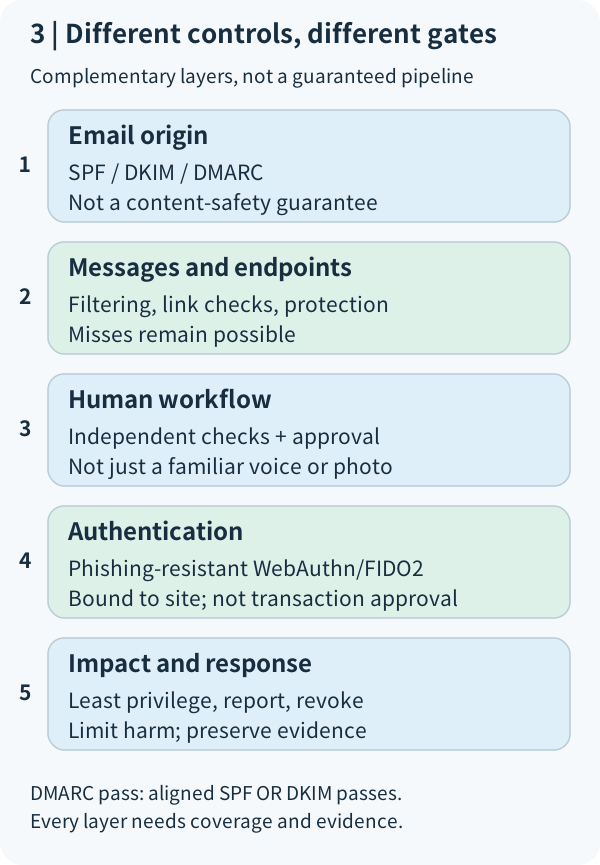
Anti-phishing controls reduce malicious messages reaching users, reduce unsafe actions, limit consequences, and support detection and response.
This connects to M01-06 defense in depth. Different layers address different problems. “Employees must be careful” places too much reliance on a person spotting every deception at the right moment. The NCSC recommends a layered approach rather than expecting staff to identify every phishing message. NCSC guidance
| Control location | Examples | What it cannot establish by itself |
|---|---|---|
| Before message delivery | Domain authentication, spam and malicious-link filtering | A delivered message is not necessarily a legitimate request |
| Before a person acts | Independent checks, sensitive-change approval, easy reporting | A real person's confirmation is not blanket authorization |
| At sign-in | Phishing-resistant authentication; protected account recovery | Successful sign-in does not approve a transaction |
| Around the impact | Least privilege, necessary data only, appropriate second review | Limited permissions do not eliminate risk |
| After unusual activity | Reporting, logs, revocation of abused access | No alert does not establish no attack |
Figure 3 maps control locations; it is not a fixed attack sequence. Some phishing asks for no login at all: it persuades someone to misuse access they already possess.
4.1 What do SPF, DKIM, and DMARC check?
A domain is an Internet name, such as the teaching example `northstar.example`. A sender display name saying “IT Department” is screen text, not identity proof.
- Sender Policy Framework (SPF) checks whether the sending host is authorized for the relevant transmission-level sender domain. It does not directly establish that the visible From field identifies your manager.
- DomainKeys Identified Mail (DKIM) uses a digital signature to verify a signing domain and the integrity of signed content. It does not encrypt the message or certify the honesty of its claims.
- Domain-based Message Authentication, Reporting, and Conformance (DMARC) checks alignment between the visible From domain and a passing SPF or DKIM identity, and provides policy/reporting mechanisms. SPF passing for just any domain is insufficient. NCSC email anti-spoofing, IETF RFC 9989
Alignment can be strict or relaxed under the relevant rules. For now, understand the required relationship between domains rather than memorizing DNS configuration.
An attacker-controlled lookalike domain may authenticate its own email successfully. A compromised genuine mailbox may also send authenticated email. Consequently, DMARC pass is not a certificate of safe content or managerial approval.
Likewise, HTTPS protects transport to the website being visited; it does not prove that the site is the organization you intended to reach. Phishing sites may have valid certificates. A padlock or logo is not sufficient.
4.2 Why is “we have MFA” insufficient?
Multi-factor authentication (MFA) uses different categories of evidence to reduce account impersonation. However, a password and a manually entered one-time password (OTP) can still be relayed from a counterfeit login page to the genuine service.
Phishing-resistant authentication binds authentication to the correct service through the protocol, rather than relying only on user vigilance. Web Authentication (WebAuthn), used with appropriate FIDO2 authenticators, is an example. A lookalike domain cannot simply reuse the genuine site's authentication material to complete that authentication. NIST SP 800-63B-4, section 3.2.5
That does not mean the user cannot be deceived. Authentication protection does not automatically stop a signed-in user following a fake manager's instruction to share records. Recovery, endpoint security, post-login sessions, and business approvals still need protection. Each layer has a purpose and a boundary.
5. Figure 4: do not expand a success signal into an unsupported conclusion
DMARC pass, MFA success and no alert each support limited claims. Investigate content, authority and monitoring coverage.
The whole diagram scales proportionally to this column. Small screens also shrink its text; open the original SVG to zoom, or read the explanation below.
- How to read the diagram
- DMARC pass, MFA success and no alert each support limited claims. Investigate content, authority and monitoring coverage.
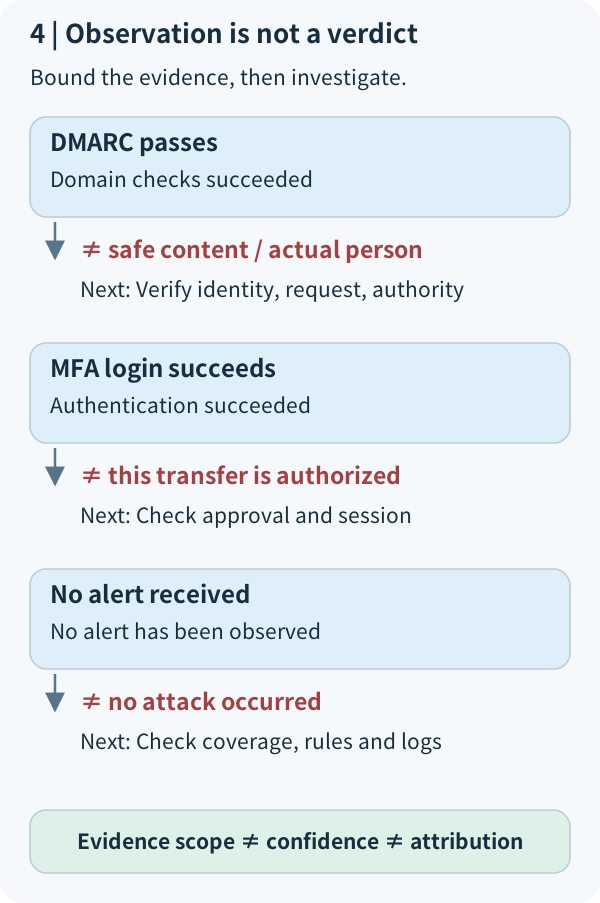
Ask what a control actually establishes.
| Observation | Supported interpretation | Not established by itself |
|---|---|---|
| A trusted receiving system records DMARC pass | Relevant authentication and alignment requirements were met | Honest content, harmless links, or approved action |
| The sign-in system records successful MFA | The system accepted authentication evidence | Every subsequent operation reflects the account holder's intent and authority |
| An established contact denies the new request | The request conflicts with this independent check | The attacker's identity or exact technique |
| No system alert | No alert observed; generation, collection, and delivery still need checking | No phishing, no disclosure, or no missed detection |
Know who produced an authentication result. “Security verified” written in a message body is not a trusted system result. Figure 4 groups observations with follow-up checks and uses red “not equal” labels to identify unsupported leaps.
6. What if you already clicked or entered information?
Do not delay out of embarrassment or click again to investigate. Record what actually happened: opening a page, entering a password, entering a code, executing a download, or sending records. Different actions require different responses. A click alone does not prove compromise.
Report through an established trusted channel. Preserve the original message, time, and necessary source information without altering evidence. If authentication material may be exposed, use a trusted entry point to follow the password and recovery-information process, and have appropriate administrators address active sessions and unusual access. A password change should not be assumed to revoke every existing session.
If unknown software ran or sensitive records were sent, authorized responders should follow the incident process. Do not forward suspicious attachments to everyone or inspect unrelated private information. This applies M01-07 incident response to social engineering.
This lesson uses fictional reasoning only. It does not send phishing tests to third parties or collect real passwords or authentication codes.
7. Reason from the diagrams: three short checks
- 1. You call the new number supplied in a message and receive confirmation. Which trust relationship is still missing in Figure 1? What source would you use instead?
- 2. An email passes DMARC and your login uses phishing-resistant authentication. Why can you not immediately upload the learner list to its new destination? Identify the missing category of control in Figure 3.
- 3. An administrator entered a password, but unusual sign-in has not been confirmed. What is known and unknown? Name two immediate actions rather than waiting for visible damage.
Reference answers are prepared separately for the website's closed-by-default answer section. Publishing answers is not evidence that the learner answered or understood.
Reference answer: 1. Why is the new number insufficiently independent?
The request and telephone number may be controlled by the same party. Reconfirmation does not establish a trusted connection to the particular request. Use previously verified records or the established system to verify data, destination, purpose, and approval. Switching apps or asking twice is insufficient; trusted channels also need maintenance.
Reference answer: 2. Why do DMARC and phishing-resistant sign-in not authorize the upload?
DMARC checks domain authentication and alignment; phishing-resistant authentication protects sign-in. Neither approves the purpose or destination of a data transfer. Independently verify the request, sharing authority, approved recipients, minimum data, and required review. A genuine account can be abused, and a genuine user can be manipulated.
Reference answer: 3. What is known and what should happen after password entry?
Password entry is known and authentication material may be exposed. Successful takeover or data disclosure is not yet established. Use a trusted entry point to follow the password-change process, report, and preserve the message and time. Appropriate administrators should review sign-ins, recovery settings, and active sessions and revoke access as needed. Do not wait for visible damage or assume a password change handled every session.
8. The chapter in one sentence
Trust does not replace verification; verification does not replace authorization; one control does not replace the whole defense.
M09-01 through M09-05 introduced forms of trust abuse. M09-06 connects verification, technical controls, and evidence boundaries into a practical workflow. The next route unit, M02-01, covers passive and active reconnaissance: again ask where information comes from, what it supports, and what requires authorization.
Concept Q&A
Pending: related questions will be edited into anonymous teaching notes when available.