CEH M03-01 | IP, TCP, UDP, Ports and Services: How Does a Network Request Find Its Destination?
1 | The core idea
IP addresses help deliver data toward a network destination; TCP or UDP provides the transport; ports help deliver data to the appropriate program; the service handles the actual request.
Imagine visiting an office building. The street address gets you to the building, an extension number identifies the relevant service desk, its intake process determines how requests and replies are handled, and the staff provide the actual service.
On a network, IP resembles the address; a port resembles a desk number; TCP and UDP represent two transport approaches; web, email, and name-resolution programs provide different services. The analogy explains their roles. Actual operation depends on protocols, program configuration, and network paths.
This lesson answers one main question: after you open a webpage, how does the data find the correct host and program? You will learn to interpret a record containing source, destination, protocol, and ports—a foundation for host discovery and scan-result interpretation. All examples use documentation addresses and can be studied on paper.
2 | IP: locate a network destination
IP, the Internet Protocol, handles addressing and packet delivery across networks. A packet is a unit of transmitted data with a header and content. The header carries information needed to process it; the payload is the content carried at that layer.
An IP header contains source and destination addresses. A router uses the destination and its routing table to select the next hop. Routing is the selection and use of these forwarding paths.
An IPv4 address is 32 bits long and commonly appears as four decimal numbers, such as `192.0.2.10`. An IPv6 address is 128 bits long and commonly uses colon-separated hexadecimal notation, such as `2001:db8::10`. RFC 8200 specifies IPv6 addressing and headers. RFC 8200: IPv6
A subnet groups addresses sharing a prefix. In `192.0.2.0/24`, `/24` identifies a 24-bit network prefix. Address configuration and routes determine whether a host sends directly to a neighbor on the same segment or through a gateway toward another network.
A device can have several interfaces and addresses. One public address may represent a proxy, load balancer, or multiple devices sharing an outbound connection. Record the observed address, time, and network observation point, then use the asset inventory to understand the service entry point.
DNS, the Domain Name System, resolves names into addresses and other records. A browser might obtain an address for `shop.example` and then use it according to its connection requirements. Name resolution and subsequent data transfer are separately verifiable steps, connecting this lesson to M02-04.
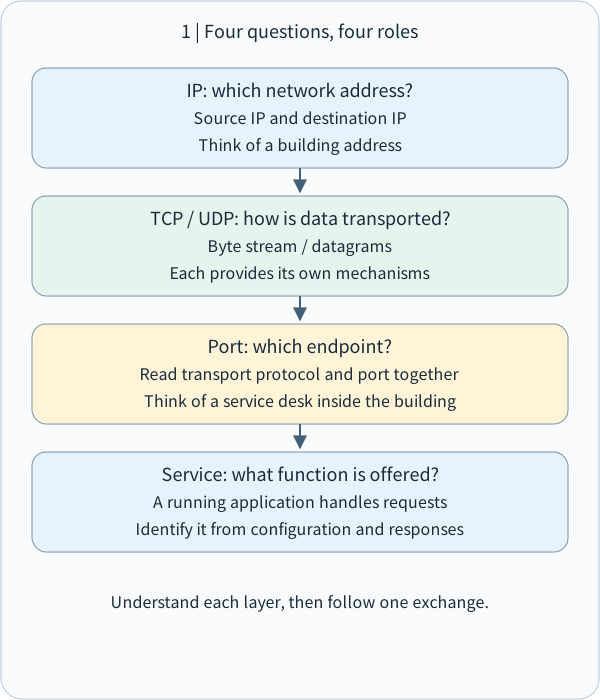
IP identifies network addresses, TCP/UDP supply transport, ports identify endpoints, and services provide application functions.
The whole diagram scales proportionally to this column. Small screens also shrink its text; open the original SVG to zoom, or read the explanation below.
- How to read the diagram
- IP identifies network addresses, TCP/UDP supply transport, ports identify endpoints, and services provide application functions.
Arrows show the teaching sequence; each step has its stated conditions.
IP: which network address?
Source IP and destination IP
Think of a building address
TCP / UDP: how is data transported?
Byte stream / datagrams
Each provides its own mechanisms
Port: which endpoint?
Read transport protocol and port together
Think of a service desk inside the building
Service: what function is offered?
A running application handles requests
Identify it from configuration and responses
Understand each layer, then follow one exchange.
3 | TCP: an ordered byte stream with connection state
TCP, the Transmission Control Protocol, provides a reliable, ordered byte stream. A stream is a continuous sequence of bytes; the application determines which bytes form a message.
A typical TCP connection starts with a three-way handshake:
1. The client sends SYN to request a connection and provide an initial sequence number.
2. The server returns SYN-ACK, providing its own initial sequence number and acknowledging the client's.
3. The client returns ACK, acknowledging the server's sequence number and completing the basic handshake.
SYN synchronizes sequence numbers; ACK acknowledges received data. A sequence number tracks byte positions. An acknowledgment number indicates the next sequence number expected by the receiver. After receiving 128 contiguous data bytes beginning at sequence 1201, the next expected value is 1329. This example assumes no gap and counts only data.
TCP coordinates transmission through acknowledgments, retransmission of lost data, flow control, and congestion control. An application that needs confirmation of a completed transaction uses its own request-and-response process, such as an order service returning an order number. RFC 9293 defines TCP. RFC 9293: TCP
Think of the handshake as establishing transport state for an exchange. Website login handles account identity at the application layer. Each stage has its own purpose. This also helps interpret sessions: network connections, authentication, and application login state can be observed separately.
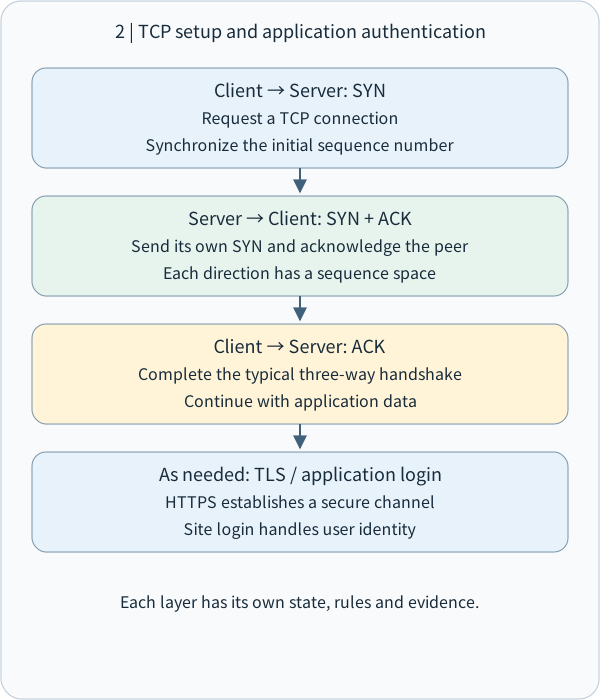
TCP establishes connection state through a three-way handshake; TLS and application login occur as required by the service.
The whole diagram scales proportionally to this column. Small screens also shrink its text; open the original SVG to zoom, or read the explanation below.
- How to read the diagram
- TCP establishes connection state through a three-way handshake; TLS and application login occur as required by the service.
Arrows show the teaching sequence; each step has its stated conditions.
Client → Server: SYN
Request a TCP connection
Synchronize the initial sequence number
Server → Client: SYN + ACK
Send its own SYN and acknowledge the peer
Each direction has a sequence space
Client → Server: ACK
Complete the typical three-way handshake
Continue with application data
As needed: TLS / application login
HTTPS establishes a secure channel
Site login handles user identity
Each layer has its own state, rules and evidence.
4 | UDP: send individual datagrams
UDP, the User Datagram Protocol, sends datagrams: individual messages with boundaries. Its header contains source port, destination port, length, and checksum. Basic UDP delivers datagrams; higher-level protocols add acknowledgment, retries, ordering, or duplicate suppression according to their needs. RFC 768: UDP
For example, real-time voice values timely audio. The application decides how to handle data based on delay, loss, and playback deadlines. Name queries often use UDP, with the querying application managing timeouts and necessary retries. DNS also supports TCP; the actual choice depends on the query and protocol requirements. RFC 1035: DNS transport
Compare their basic interfaces: TCP offers an ordered byte stream; UDP offers independent datagrams. Overall reliability, latency, and security emerge from the complete protocol stack and implementation.
Modern web traffic provides an example. QUIC is a secure, multiplexed transport protocol built over UDP, adding features such as streams and reliable transport. HTTP/3 maps web requests and responses onto QUIC. UDP traffic can therefore carry modern web services. RFC 9000: QUIC, RFC 9114: HTTP/3
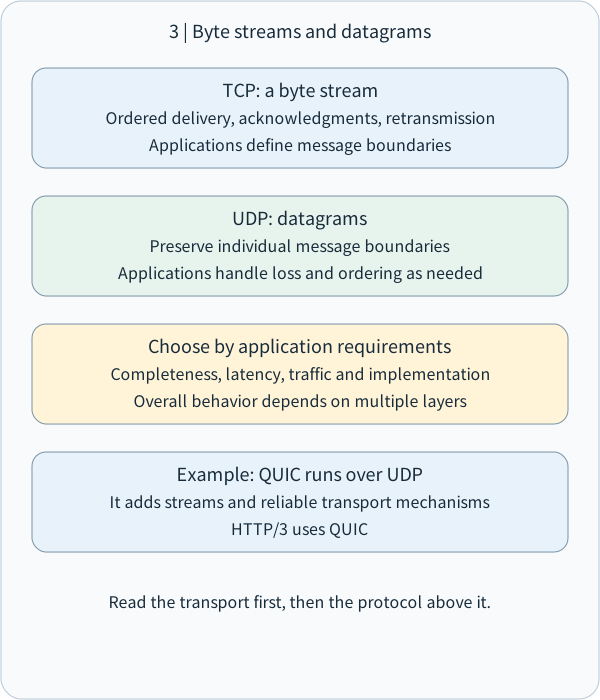
TCP provides a reliable ordered byte stream; UDP delivers datagrams. Application protocols define additional requirements.
The whole diagram scales proportionally to this column. Small screens also shrink its text; open the original SVG to zoom, or read the explanation below.
- How to read the diagram
- TCP provides a reliable ordered byte stream; UDP delivers datagrams. Application protocols define additional requirements.
Parallel cards compare categories; their order does not imply a process.
TCP: a byte stream
Ordered delivery, acknowledgments, retransmission
Applications define message boundaries
UDP: datagrams
Preserve individual message boundaries
Applications handle loss and ordering as needed
Choose by application requirements
Completeness, latency, traffic and implementation
Overall behavior depends on multiple layers
Example: QUIC runs over UDP
It adds streams and reliable transport mechanisms
HTTP/3 uses QUIC
Read the transport first, then the protocol above it.
5 | Ports: deliver data to the appropriate program endpoint
A port is a numeric field used by transport protocols such as TCP and UDP to help an operating system distinguish communication endpoints. TCP and UDP have separate port namespaces, so `TCP/53` and `UDP/53` are separately handled endpoints.
The port field has 16 bits, covering 0–65535. IANA, the Internet Assigned Numbers Authority, divides the registry into system ports 0–1023, user ports 1024–49151, and dynamic/private ports 49152–65535. Port 0 is reserved. IANA service-name and port-number registry
When a client sends a request, the operating system typically chooses a temporary source port. The server offers its service at a configured destination port. An ephemeral port is a temporarily used port; its actual selection range depends on operating-system configuration. IANA's dynamic range is a registry classification, while host settings govern observed behavior.
Example: `192.0.2.10:53000 → 198.51.100.20:443, TCP`.
This describes TCP communication from source address 192.0.2.10, port 53000, to destination address 198.51.100.20, port 443. Return traffic is directed to the client's source port so the operating system can identify the requesting program.
A five-tuple commonly consists of source IP, source port, destination IP, destination port, and transport protocol. It describes a network flow. Add the time and observation point to distinguish exchanges at different stages.
6 | Services: the programs and rules that handle requests
A service is a program or process providing a function, such as web access, name resolution, email, or remote administration. A listener is an endpoint where a program is ready to receive communication. A socket is a programming interface for network interaction, often described by address, port, and protocol information for its binding or connection.
A server can host multiple services, and one service can span several machines. Binding a program to an address affects which interfaces receive its traffic. A development service bound only to a loopback address serves local programs. When bound to an external interface, host and network rules further determine reachability.
Useful common conventions include SSH, Secure Shell for remote administration, on TCP/22; DNS on UDP/53 and TCP/53; HTTP, Hypertext Transfer Protocol, on TCP/80; HTTPS, HTTP carried through a secure channel, commonly on TCP/443; and HTTP/3 over QUIC, commonly on UDP/443.
Use the registry convention to form an initial service hypothesis, then confirm it through configuration, actual protocol responses, and administration records. Programs can use custom ports, such as 8443 for a test website. Record the protocol, port, and observed response together.
A reverse proxy may receive a public web request and forward it to an internal program. One IP can also host several websites. The website name, TLS configuration, and HTTP request help determine the eventual service. This extends the distinction between address, port, and service.
7 | Worked example: opening a secure webpage
This synthetic scenario uses documentation addresses and makes no live connection. Assume this browser exchange uses HTTPS over TCP.
First, the browser obtains 198.51.100.20 as the service address for `shop.example` through name resolution. A real system may use a cached result.
Second, client 192.0.2.10 selects source port 53000 and connects to destination TCP/443. Routers forward traffic according to routes, and firewalls handle the flow under their configured rules.
Third, TCP completes the basic handshake. TLS, Transport Layer Security, then establishes a secure channel. The browser checks conditions including the service certificate and website name.
Fourth, the browser sends an HTTP request and the web service returns content. If login is required, the application handles account authentication and authorization. If the user places an order, the service returns a transaction result.
Organize the example into four evidence cards:
- Address card: which address did the name resolve to, from which source, and when?
- Transport card: TCP or UDP, and which source and destination ports?
- Secure-channel card: what were the TLS connection and certificate-check results?
- Application card: which HTTP response, login result, or transaction outcome was received?
This layered approach supports precise troubleshooting statements: name resolution succeeded and TCP is established, so TLS settings are under review; or the webpage responded, so application permissions are being checked. Each stage has its own observable data.
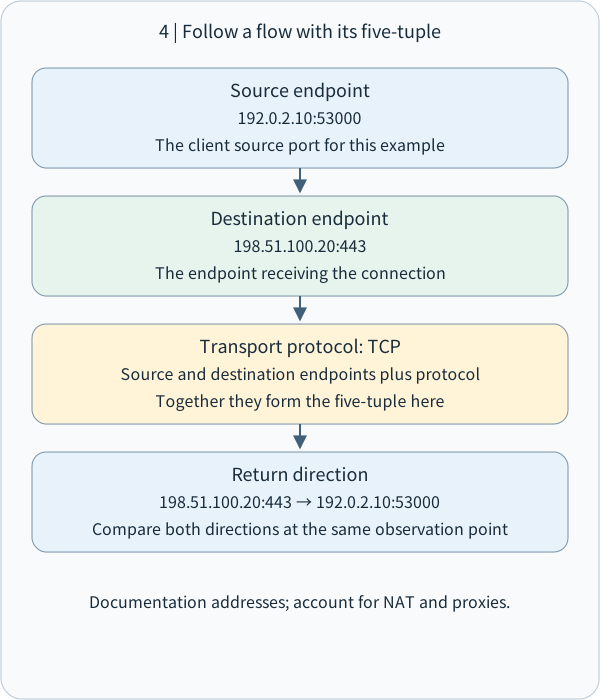
Source IP, source port, destination IP, destination port and transport protocol describe a communication flow.
The whole diagram scales proportionally to this column. Small screens also shrink its text; open the original SVG to zoom, or read the explanation below.
- How to read the diagram
- Source IP, source port, destination IP, destination port and transport protocol describe a communication flow.
Arrows show the teaching sequence; each step has its stated conditions.
Source endpoint
192.0.2.10:53000
The client source port for this example
Destination endpoint
198.51.100.20:443
The endpoint receiving the connection
Transport protocol: TCP
Source and destination endpoints plus protocol
Together they form the five-tuple here
Return direction
198.51.100.20:443 → 192.0.2.10:53000
Compare both directions at the same observation point
Documentation addresses; account for NAT and proxies.
8 | Turn the concepts into controls and records
Map each service from business purpose to program, bound address, protocol/port, permitted sources, and responsible owner. Open the entry points required by the business. Use approved network and identity conditions for administration. When retiring a service, close its endpoints and update the inventory together.
A firewall handles traffic according to rules. Layer 3 conditions commonly include IP addresses; Layer 4 conditions include TCP/UDP and ports. Actual policies depend on the product and architecture. Application authentication and authorization operate at their corresponding layers.
In an authorized environment, compare three evidence types: host listening configuration, network rules and logs, and normal user-facing service responses. For example: the program binds to an internal address on TCP/8443; policy allows only the management network; that network connects successfully while other approved test sources are restricted according to policy.
If observations span NAT, Network Address Translation, or a proxy, retain the observation point and mapping records. Addresses or ports may differ across those points. This connects to M02-06 network footprinting and M02-08's separation of sources, times, observations, and inferences.
This lesson practices reading records. Later exercises introduce host discovery, scanning, and service identification in explicitly authorized isolated environments, recording tools, parameters, scope, and responses.
9 | Paper exercise and checks
Read two synthetic records:
Record A: `192.0.2.10:53000 → 198.51.100.20:443, TCP`.
Record B: `192.0.2.10:53001 → 198.51.100.20:443, UDP`.
Write each five-tuple and add one sentence identifying the next service evidence you would seek. This connects the numbers and transport mechanisms to actual functions.
Check 1: which pairing best describes IP, ports, and services? A. IP is a login password; B. A port is an application name; C. IP helps address traffic, ports help select endpoints, and services handle requests; D. All three are identical.
Check 2: how do TCP/443 and UDP/443 relate? A. Different protocols require separate identification; B. They are always one connection; C. Matching ports share all state; D. UDP can only use port 53.
Check 3: for a TCP-based service, what does the TCP handshake handle, and what does website login handle? Explain each in your own words.
Check 4: when you observe traffic to TCP/8443, what information would you retain, and where would you confirm the service's actual purpose?
Reference answers accompany the material. Responses and understanding are recorded from actual learner replies.
Identify the address, then the protocol and port, and use service evidence to confirm the purpose. Next, M03-02 introduces host discovery through ICMP and ARP in authorized environments.
Reference answer: Check 1
C. IP supports addressing and forwarding. Ports in transport protocols such as TCP and UDP help the operating system deliver data to communication endpoints. Programs provide services under application rules. Connect addresses, protocol, ports, and service evidence when reading a record.
Reference answer: Check 2
A. TCP and UDP have separate port namespaces, so TCP/443 and UDP/443 require separate identification. Common examples are HTTPS over TCP and QUIC/HTTP/3 over UDP. Confirm actual use through service configuration and protocol responses.
Reference answer: Check 3
The TCP three-way handshake synchronizes initial sequence numbers and establishes transport connection state. Website login authenticates an account at the application layer. HTTPS additionally establishes a TLS secure channel according to the service flow. Examine each layer's own result.
Reference answer: Check 4
Retain source and destination IPs, source and destination ports, TCP, timestamp, observation point, and actual responses. Consult host listeners and program configuration, the asset inventory, reverse-proxy configuration, and owner-maintained records. Where authorized, corroborate protocol responses. Port 8443 supplies a service hypothesis; these sources establish its actual purpose.
Concept Q&A
Pending: related questions will be edited into anonymous teaching notes when available.