CEH M02-05 | Email Footprinting: Reading Delivery Paths and Domain Authentication
1 | The main idea
Email footprinting uses public contact information and original messages you are authorized to inspect to organize sending domains, mail services, delivery paths, and authentication results. Together, these clues answer: Which systems handled this message? Which domain was used? What checks did the receiving system perform?
This lesson follows M02-04 DNS: MX records help locate receiving services; now we examine the evidence left by an actual message. It also connects to M09 anti-phishing: technical checks help validate domain use and delivery, while important business requests are confirmed through an established independent channel.
Remember the division of work: the envelope routes delivery, headers describe the message, and the receiving system supplies path and authentication evidence. All examples use synthetic data and .example domains for offline reading practice.
2 | Understand email through a parcel delivery
A parcel has a shipping label on the outside and a letter inside. Email also has two layers.
The envelope carries system delivery information. In SMTP (Simple Mail Transfer Protocol), MAIL FROM supplies the return path for delivery errors, while RCPT TO identifies actual delivery recipients. The header is the set of fields at the start of the message, including the visible From, To, and Subject. The body carries text and associated content.
For example, an event platform may send a coffee shop's receipt. The visible From can be [email protected] while [email protected] handles delivery errors. Label the separate responsibilities first. Bcc provides another helpful illustration: a recipient can be in the delivery envelope while the visible To field presents a different list. SMTP envelope and transport, message format
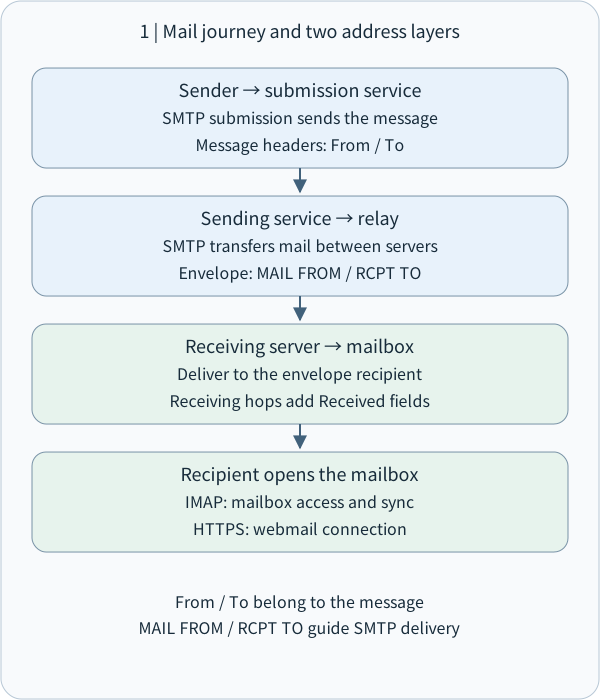
A common path is: sender's mail application → submission service → one or more relay servers → recipient server → recipient's mail application. A relay is an MTA (Mail Transfer Agent), which hands the message to the next system. Webmail lets a person use a mailbox through a website. Internet mail architecture
Think of ports as numbered service entrances. Server-to-server SMTP commonly uses TCP 25; user submission commonly uses 587 or implicit TLS on 465. TLS (Transport Layer Security) protects data in transit. IMAP (Internet Message Access Protocol) lets a mail application read and synchronize a mailbox; implicit TLS commonly uses 993. Webmail usually uses HTTPS on 443. Interpret a port together with the service configuration. TLS for mail submission and access
Envelope addresses route mail; message headers present it. SMTP sends; IMAP or HTTPS reads.
The largest diagram text is capped at body size. Narrower columns shrink the whole diagram; open the original SVG to zoom.
- How to read the diagram
- Envelope addresses route mail; message headers present it. SMTP sends; IMAP or HTTPS reads.
3 | Open the original message: each field answers a question
In browser-based Gmail, open a message you received and choose Show original from the More menu next to Reply. Other mail applications may call this View source or Full headers. Preserve the original and prepare a redacted working copy for analysis. Gmail's official steps
• From: the presented author address. A display name is the human-friendly name beside it. Read the complete address and its domain.
• Reply-To: the suggested reply destination. Customer-service, delegated-sending, and ticketing systems may use a separate address; compare it with the actual business workflow.
• To / Cc: the message's presented primary and copy recipients.
• Return-Path: the return path recorded at final delivery, useful for comparison with the SMTP envelope.
• Date: the creation date declared in the message. Retain the time zone when comparing it with receipt time.
• Message-ID: a message identifier useful for searching and correlating logs. Services may also assign their own internal message IDs; record them separately.
• Received: reception records left by delivery nodes, central to rebuilding the message route.
• Authentication-Results: checks recorded by an authentication service, often including SPF, DKIM, and DMARC. Message fields, authentication-result header
Role mailboxes such as info@ and support@ on public contact pages, and department or contact details in signatures, can also reveal an organization's public footprint. Collect fields relevant to the task and separate public-page information from technical message evidence. This continues M02-02 source validation: each field retains its own source and time.
4 | Read Received: establish trusted nodes, then rebuild chronology
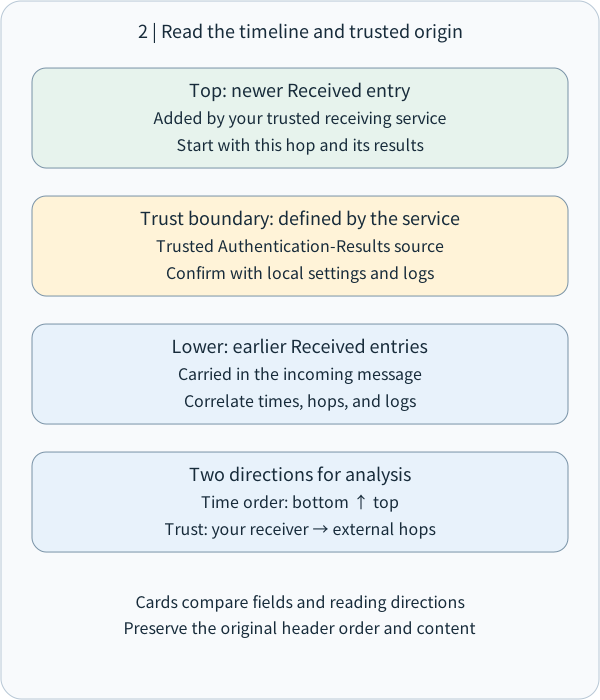
A mail server normally prepends its Received field when accepting a message. Newer reception records therefore tend to appear at the top. Reading from the bottom upward helps describe delivery in chronological order. SMTP trace information
For verification, start with your receiving system's trusted record. Identify which server recorded receiving the message from which connection peer, then trace earlier stages. These are two distinct directions: narrate the route forward in time, and extend trust outward from your own system.
Suppose a trusted receiving node records this synthetic entry:
Received: from outbound.mailer.example (192.0.2.25)
        by mx.recipient.example;
        Sat, 31 Oct 2026 10:00:05 +0000
The recorded fact is that mx.recipient.example accepted mail at that time from a connection at 192.0.2.25, with the listed peer name. Once its origin in your receiving system is established, this record supports that delivery segment. A provider's outbound IP describes a service node; tracing an operating account or device calls for authorized correlation with service records.
Earlier Received entries may come from other systems. Record who generated each segment and what evidence can corroborate it. Each time stamp also depends on a time zone and a system clock; normalize zones and check trusted nodes when studying delays. This applies M02-01 scope to mail: the lesson reads available evidence, while probes or test messages to third parties follow separate written authorization.
New Received entries are prepended. Read the timeline upward; validate outward from a trusted receiver.
The largest diagram text is capped at body size. Narrower columns shrink the whole diagram; open the original SVG to zoom.
- How to read the diagram
- New Received entries are prepended. Read the timeline upward; validate outward from a trusted receiver.
5 | SPF, DKIM, and DMARC: three complementary checks
Think of an approved delivery-vehicle list, a document seal, and a rule matching the brand to its credentials. Together they provide technical evidence about sending domains. Requests for payments, logins, or data then connect to M09-06 independent verification.
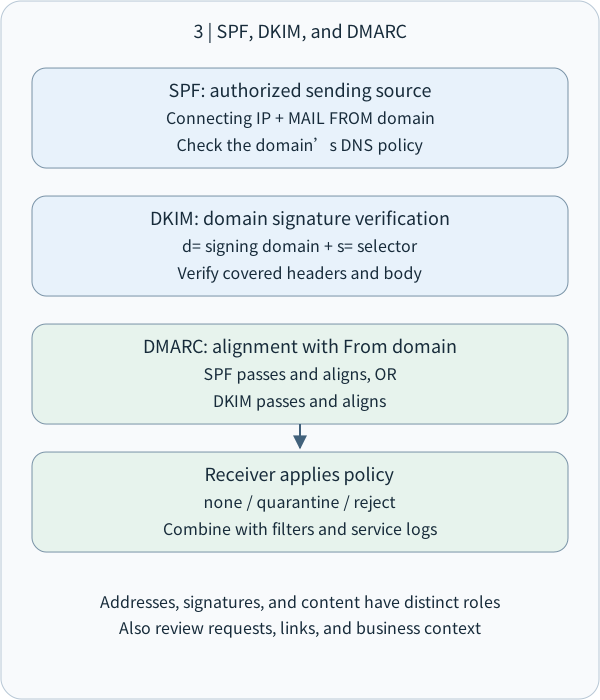
SPF (Sender Policy Framework) lets a domain publish which sources may send for it in DNS. The receiver primarily compares the current connecting IP with the policy for the SMTP MAIL FROM domain; relevant cases also check HELO identity. HELO / EHLO is the SMTP connection's identity greeting. SPF asks: Does this sending source fit this domain's sending policy? SPF specification
DKIM (DomainKeys Identified Mail) uses a private key to create a digital signature that a receiver checks against a public key in DNS. The d= tag identifies the signing domain; s= is the selector used to locate the key. Verification covers the selected headers and body data, helping validate the signing domain and consistency of the protected content. DKIM specification
DMARC (Domain-based Message Authentication, Reporting, and Conformance) checks alignment between the visible From domain and a domain authenticated by SPF or DKIM. At least one path must both pass authentication and align with From. Strict alignment requires the same domain; relaxed alignment follows organizational-domain rules. Current DMARC specification, RFC 9989
A domain may publish handling preferences: p=none for observation and evaluation, p=quarantine to recommend quarantine, and p=reject to recommend rejection. Receiving systems combine these with local policy and other signals. RFC 9989, published in 2026, replaces RFC 7489; this lesson uses the current specification's core concepts. DMARC handling policy
When reading Authentication-Results, identify the authserv-id, or authentication-service identifier, and use results from your trusted mail service. Forwarding changes the connection IP visible to a receiver; a mailing list's footer may change signed content. Investigate differing results with the forwarding path, domain alignment, and service logs. Result-header trust model, indirect mail flows
SPF checks envelope-domain IP authorization, DKIM checks signatures, and DMARC checks alignment with From.
The largest diagram text is capped at body size. Narrower columns shrink the whole diagram; open the original SVG to zoom.
- How to read the diagram
- SPF checks envelope-domain IP authorization, DKIM checks signatures, and DMARC checks alignment with From.
6 | Worked example: a platform sends the coffee shop's receipt
This teaching excerpt omits real signatures and other headers. Assume a trusted receiving system produced the results:
From: Coffee Shop <[email protected]>
Reply-To: [email protected]
Return-Path: <[email protected]>
Authentication-Results: mx.recipient.example;
        spf=pass smtp.mailfrom=mailer.example;
        dkim=pass header.d=coffee.example;
        dmarc=pass header.from=coffee.example
First, identify roles. The visible author uses coffee.example, replies go to its support address, and delivery errors go to mailer.example.
Second, read each check. SPF pass says the current source fits mailer.example's policy. DKIM pass says the coffee.example signature validated.
Third, check alignment. From uses coffee.example and DKIM d= also uses coffee.example. That DKIM path has both a successful check and alignment, supporting DMARC pass. SPF checks the sending platform's mailer.example identity in this example.
Fourth, connect the business context. For a receipt from a purchase you just made, compare the order ID, items, and amount. A request to change payment details should be confirmed through a previously saved contact channel. The technical layer validates domain use; the business layer validates the requested action.
7 | Turn footprinting into protection and useful evidence
For administrators, inventory the systems sending on the organization's behalf: support, newsletters, receipts, and cloud services. Compare SPF, DKIM, and DMARC settings with that inventory. Test legitimate sending and forwarding incrementally, review results and reports, and adjust handling policy for the organization's needs. Multi-factor authentication, unusual-login detection, and established independent confirmation channels cover accounts and business processes alongside domains.
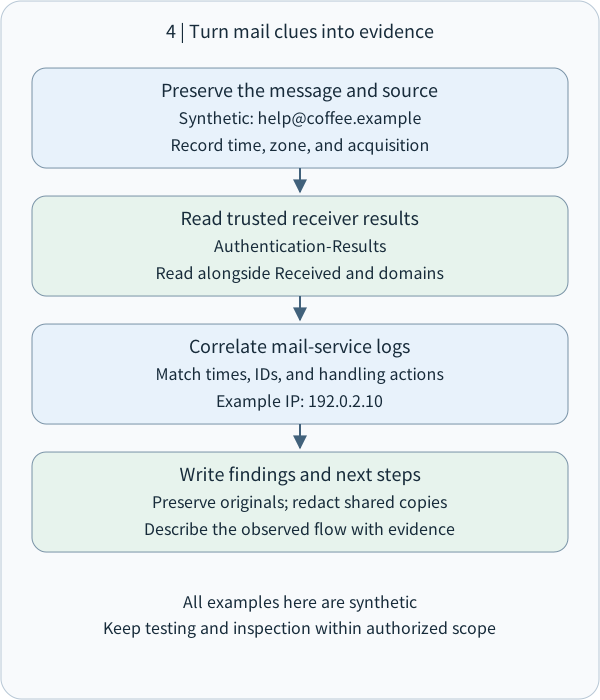
For analysts, a useful record contains message provenance and access authorization, acquisition time and zone, original file or internal identifier, trusted receiving nodes, relevant domains, SPF / DKIM / DMARC results, business checks, and next steps. Keep a controlled original and share redacted excerpts; headers can contain addresses, internal names, or personal information.
Email tracking is another footprinting topic: a requested remote image or tracking link can produce a server-side request record. Image proxies, caching, and preloading affect its interpretation. Report which resource was requested and when, then corroborate reading behavior with an appropriate recipient response or other evidence. This lesson uses offline analysis of available data; active tracking and test sending follow separately authorized exercise rules. Apple Mail Privacy Protection
Within scope, preserve a synthetic message, trusted results, and correlated logs; redact private data for sharing.
The largest diagram text is capped at body size. Narrower columns shrink the whole diagram; open the original SVG to zoom.
- How to read the diagram
- Within scope, preserve a synthetic message, trusted results, and correlated logs; redact private data for sharing.
8 | Small check: connect sending roles and authentication
Synthetic case: From is [email protected]; Return-Path is [email protected]. A trusted receiver records SPF pass for platform.example, DKIM pass with d=shop.example, and DMARC pass.
Explain briefly: ① Which domains handle delivery errors and the visible author? ② Which authentication path aligns with From? ③ If the message requests a new payment account, which established channel would you use to confirm it?
Multiple choice: To identify the connection peer from which your mail server accepted a message, which evidence do you check first? A. Display name; B. Received generated by your trusted node; C. Subject; D. Message signature block.
Reference answers will accompany the website lesson. Try your own explanation first; it will help focus any follow-up teaching.
Reference answer: Mail roles and authentication
Delivery errors go to platform.example, while the visible author uses shop.example. The trusted receiver records a valid DKIM signature with d=shop.example, matching the From domain. That path satisfies both DMARC authentication and alignment.
SPF pass describes the sending-source check for the envelope domain platform.example. Labeling each check's subject makes the platform's delegated-sending roles clear.
Confirm a request to change payment details through a previously saved official phone number, known customer-service portal, or established contact. An independently obtained channel supports the business check alongside technical verification.
Reference answer: Received and trusted records
Choose B: start with Received generated by your trusted node. It records that node's connection peer and reception time and can be correlated with your logs. Then establish the origin of upstream records and organize their chronology.
9 | Takeaway
Read a message through four questions: Who is presented as its author? How did the envelope route it? Which paths and checks did trusted systems record? How will the actual request be confirmed?
This connects M02 sources, DNS, and footprinting with M09 trust and independent verification. M02-06 extends the same relationship-building approach to IP addresses, ASNs, traceroute, and network footprinting.
This is one complete Email Footprinting unit, including the supporting delivery and authentication concepts. Technical sources are IETF RFCs and official Google and Apple guidance; all scenario data is synthetic.
Concept Q&A
Pending: related questions will be edited into anonymous teaching notes when available.